## Week 9 Lab Overview |User Interface|Graphics Library|Notebook(s)| |:--|:--|:--| |[observablehq.com](https://observablehq.com)|[D3](https://d3js.org/)|[3D Visualizations in D3 Example](https://observablehq.com/@rk2546/3d-visualizations-in-d3-example)| ### Today's Lab Activities Today we will be a exploring the following topics: 1. Group and Mini Projects: Reminders 2. Main Lab Activities: 1. Common Libraries for 3D Visualizations 2. Re-Visiting Algebra 3. 2D Transformations 4. Homogeneous Coordinates 5. 3D Transformations 6. Model-View-Projection ## Group and Mini Projects: Reminders | **Assignment** | **Due Date** | **Details** | |---------------|--------------|-------------| | **Milestone #3: First Draft** | Nov. 17 | Initial D3 implementations | | **Mini-Project #2** | Nov. 20 | Temporal Data Visualizations | ## Group Project Milestone #3: Deliverables Submit an **Observable notebook** or a **Framework project** with: * Brief introduction to your project * For each question: - State the question - Show the D3 visualization - Describe what the visualization shows - Answer the question based on the visualization **At this stage:** * All visualizations should be implemented in D3 * Focus on getting the basics working * Styling/polish can come later * Interactivity should be functional (if included) * It's still okay to refine questions if needed ## Group Project Milestone #3: Reminders This is your first implementation milestone. - **We expect working D3 code for all your visualizations.** - Your visualizations don't need to be perfect, but they should work and show your data correctly. - labels might be messy - colors might be defaults - interactions might be basic - This is when you discover implementation challenges: - "This chart type is harder than I thought..." - "The data is more complex than I realized..." - We'll give you feedback on what to improve for the next draft. ## Common Libraries for 3D Visualization - Three.js: General 3D applications - CesiumJS: 3D Geovisualizations - deck.gl: GPU-based Visualizations ## How Do These Libraries Work? Our data resides within a 2D or 3D space, as viewed by the user through a 2D viewpoint. How the data is projected onto the screen, relative to the viewpoint, is a fundamental operation in most 2D and 3D graphics libraries. 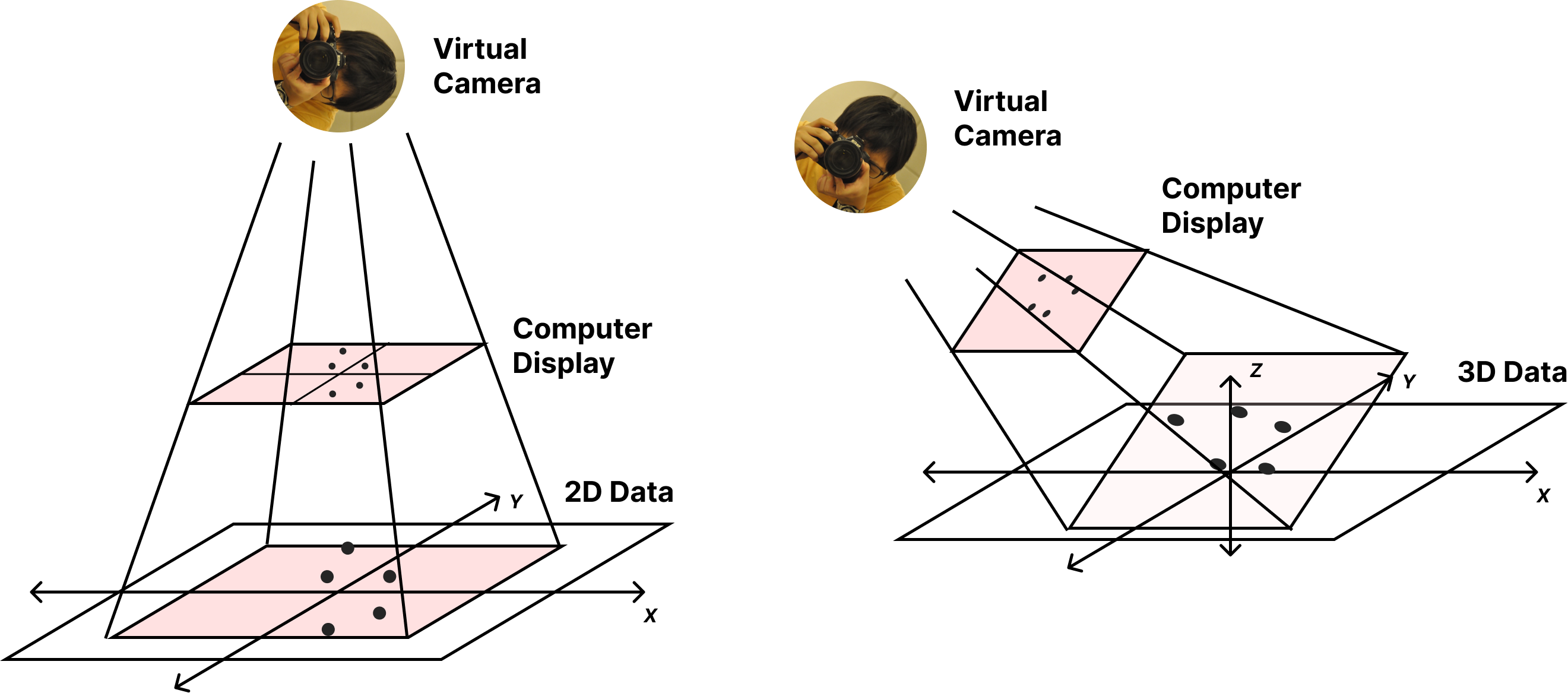{width="75%" fig-align="center"} ## How Do These Libraries Work? :::{.columns3} ::::{.column width="45%"} These fundamental operations are crucial in other domains beyond just data visualization, such as video games, virtual reality, interactive computer graphics, and 3D CAD tools. :::: ::::{.column width="5%"} :::: ::::{.column width="50%"} 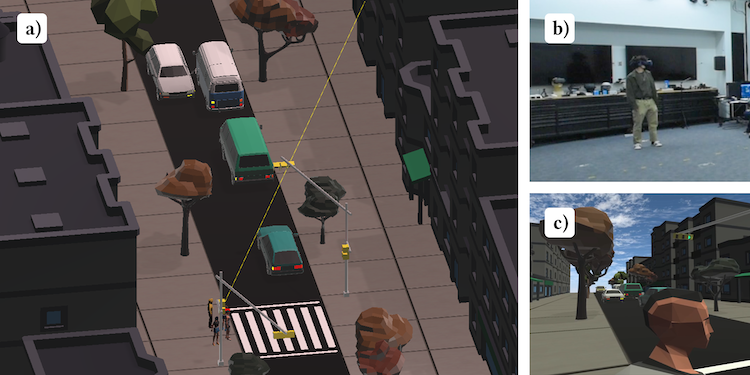{width="100%"} Ryan Kim and Paul M. Torrens. 2024. Building Verisimilitude in VR With High-Fidelity Local Action Models: A Demonstration Supporting Road-Crossing Experiments. In 38th ACM SIGSIM Conference on Principles of Advanced Discrete Simulation (SIGSIM PADS ’24), June 24–26, 2024, Atlanta, GA, USA. ACM, New York, NY, USA, 12 pages. :::: ::: ## Revisiting Algebra: Vectors ### Vectors :::{.columns2} ::::{.column width="30%"} 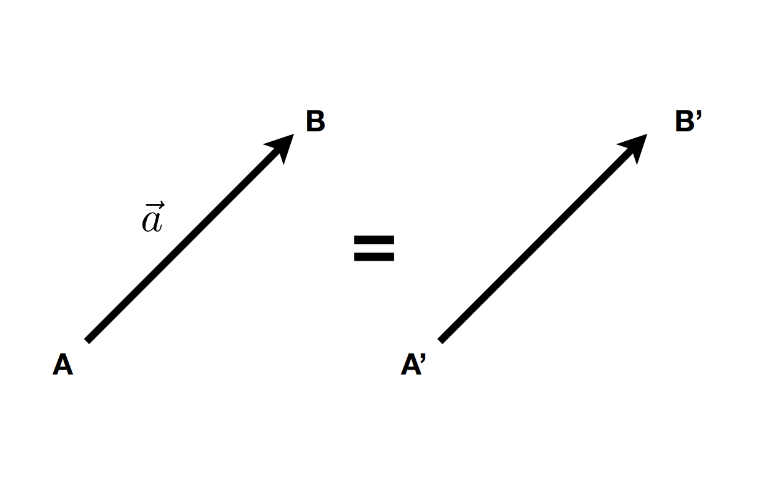 :::: ::::{.column width="70%"} - A **vector** $\overrightarrow{(x, y, z, …)}$ describes a _direction_ and a _length_ without a starting point. - A vector is NOT a pair ${x,y}$, NOR a position $(x,y)$ $$ \overrightarrow{AB} = B - A $$ - A **unit vector** is a vector with length = 1 (direction-only) $$ \hat{a} = \frac{\overrightarrow{a}}{\|\overrightarrow{a}\|} $$ :::: ::: --- ### Vector Math :::{.columns2} ::::{.column width="30%"} 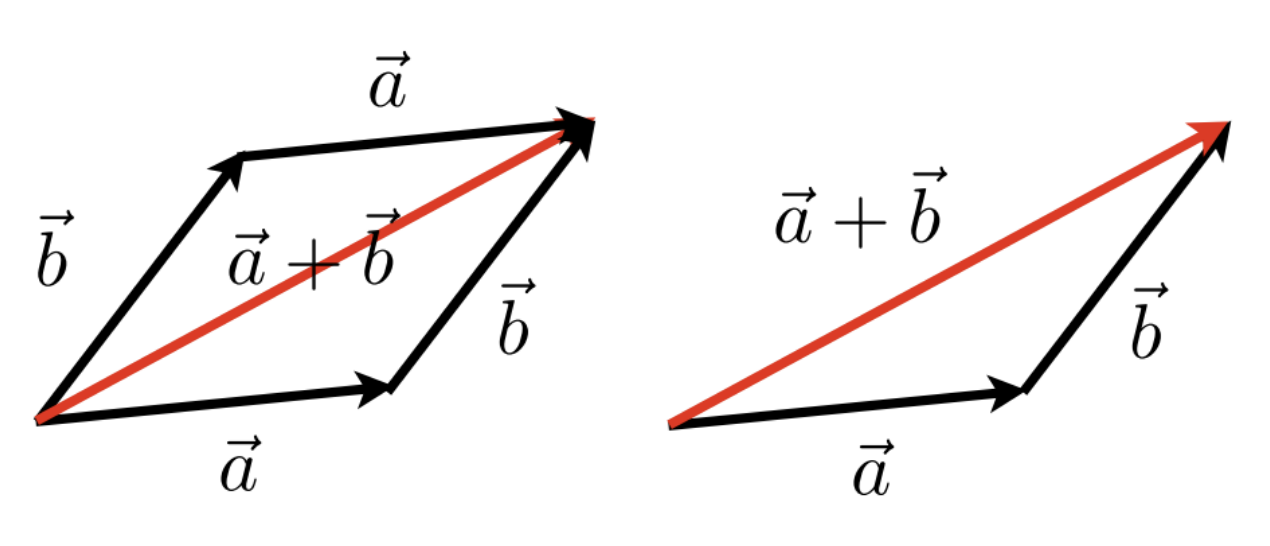 :::: ::::{.column width="70%"} $$ \overrightarrow{a} + \overrightarrow{b} = \overrightarrow{b} + \overrightarrow{a} $$ :::: ::: ### Dot Product :::{.columns2} ::::{.column width="30%"} 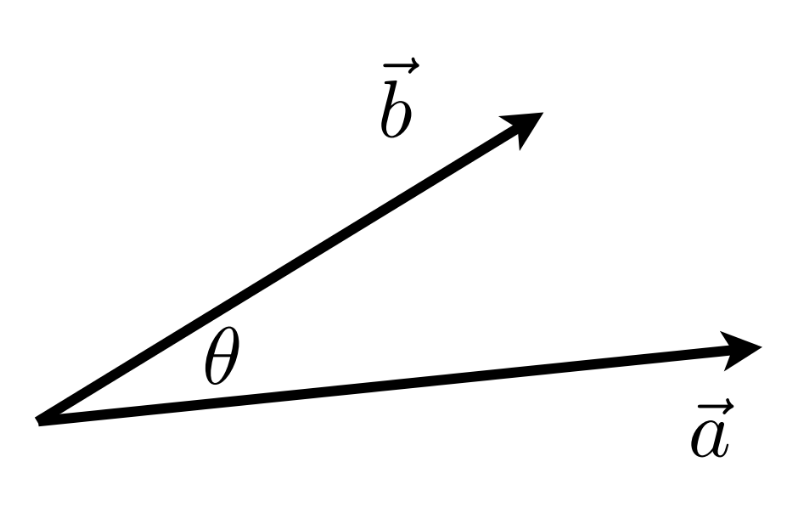 :::: ::::{.column width="70%"} $$ \overrightarrow{a} \cdot \overrightarrow{b} = \|\overrightarrow{a}\|\|\overrightarrow{b}\|\cos{\theta} $$ $$ \cos{\theta} = \frac{\overrightarrow{a} \cdot \overrightarrow{b}}{\|\overrightarrow{a}\|\|\overrightarrow{b}\|} $$ :::: ::: --- ### Cross Product :::{.columns2} ::::{.column width="30%"} 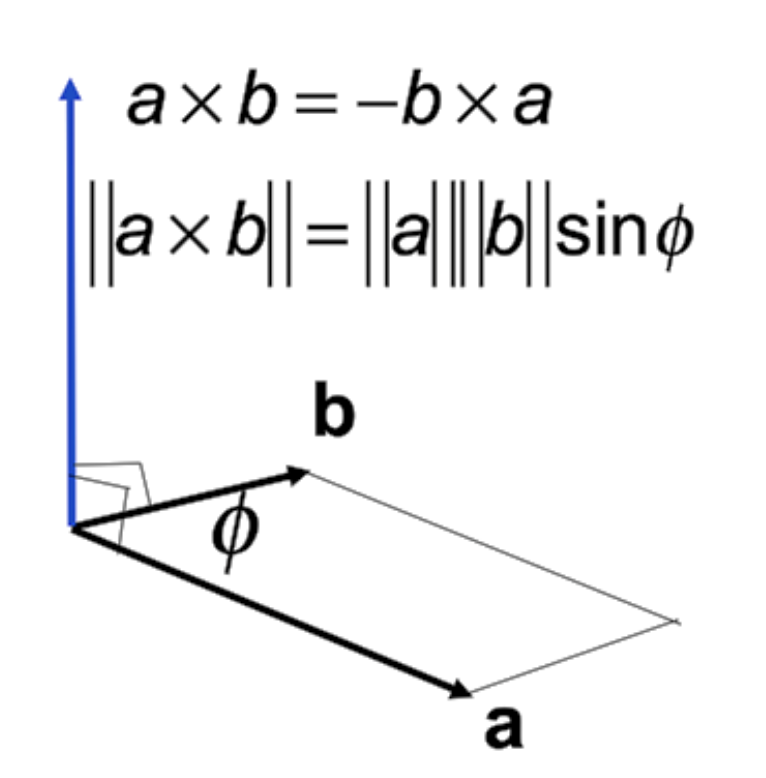 :::: ::::{.column width="70%"} - Orthogonal to two initial vectors - Direction determined by right-hand rule - Useful in constructing coordinate systems :::: ::: ## Revisiting Algebra: Matrices $$ \begin{pmatrix} 1 & 2 & 3 \\ 4 & 5 & 6 \end{pmatrix} $$ - **Matrix**: An array of numbers, with $N$ rows and $M$ columns. ### Multiplication - Imagine you want to multiply two matrices: $A$ (an $N \times M$ matrix) and $B$ (an $M \times P$ matrix) ... - The number of columns in A must MUST = the number rows in B. - The outcome = an $(M \times P)$ matrix - $(M \times N) (N \times P) = (M \times P)$ $$ \begin{pmatrix}a & b \\ c & d\end{pmatrix} \begin{pmatrix}e & f \\ g & h\end{pmatrix} = \begin{pmatrix} ae + bg & af + bh \\ ce + dg & cf + dh \end{pmatrix} $$ --- ### Let's Practice $$ \begin{pmatrix} 1 & 3 \\ 5 & 2 \\ 0 & 4 \end{pmatrix}\begin{pmatrix}3 & 6 & 9 & 4 \\ 2 & 7 & 8 & 3 \end{pmatrix} = \begin{pmatrix}9 & ? & 33 & 13 \\ 19 & 44 & 61 & 26 \\ 8 & 28 & 32 & ? \end{pmatrix} $$ ### Keep in Mind: - Keep in mind that matrix multiplication is: - Non-commutative (AB and BA are different in general) - Associative and distributive - $A(B+C) = AB + AC$ - $(A+B)C = AC + BC$ ## Matrix-Vector Multiplication - Treat vector as a column matrix $(m \times 1)$ $$ \begin{pmatrix}-1 & 0 \\ 0 & 1\end{pmatrix}\begin{pmatrix}x \\ y\end{pmatrix} = \begin{pmatrix}-x \\ y\end{pmatrix} $$ ## Transformations: Scaling 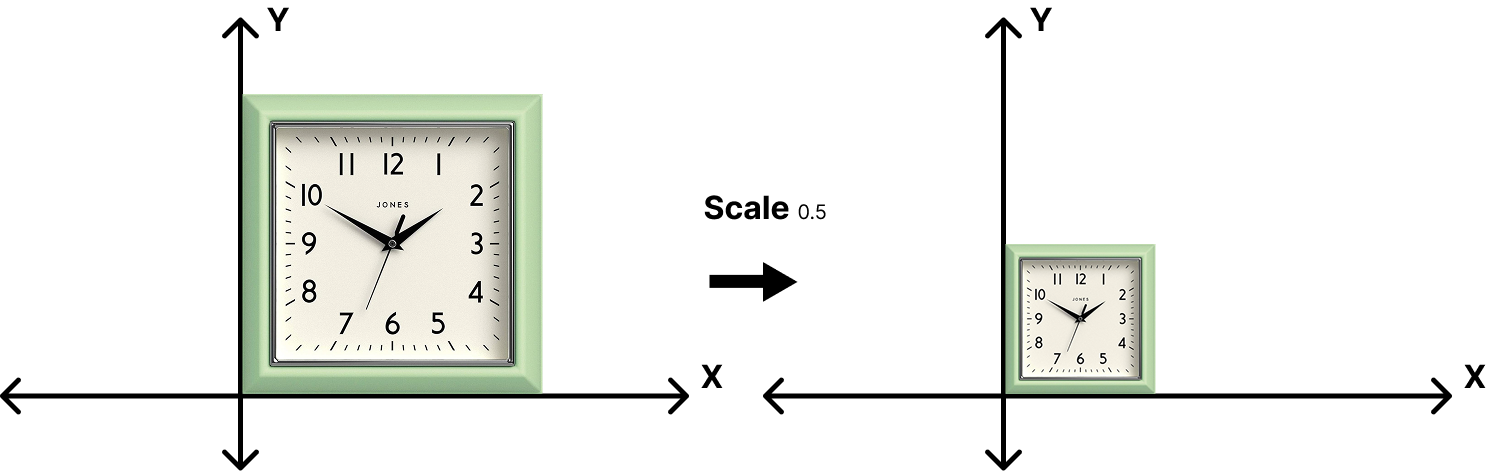 $$ \begin{bmatrix}x' \\ y'\end{bmatrix} = \begin{bmatrix}s & 0 \\ 0 & s\end{bmatrix}\begin{bmatrix}x \\ y\end{bmatrix} $$ ## Transformations: Scaling 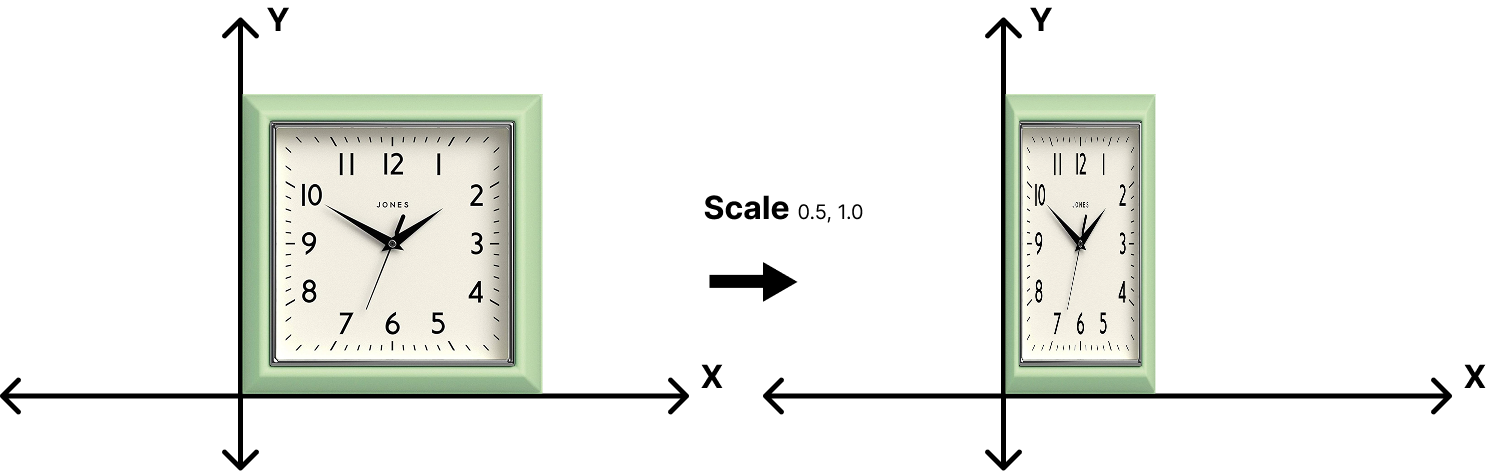 $$ \begin{bmatrix}x' \\ y'\end{bmatrix} = \begin{bmatrix}s_x & 0 \\ 0 & s_y\end{bmatrix}\begin{bmatrix}x \\ y\end{bmatrix} $$ ## Transformations: Reflection 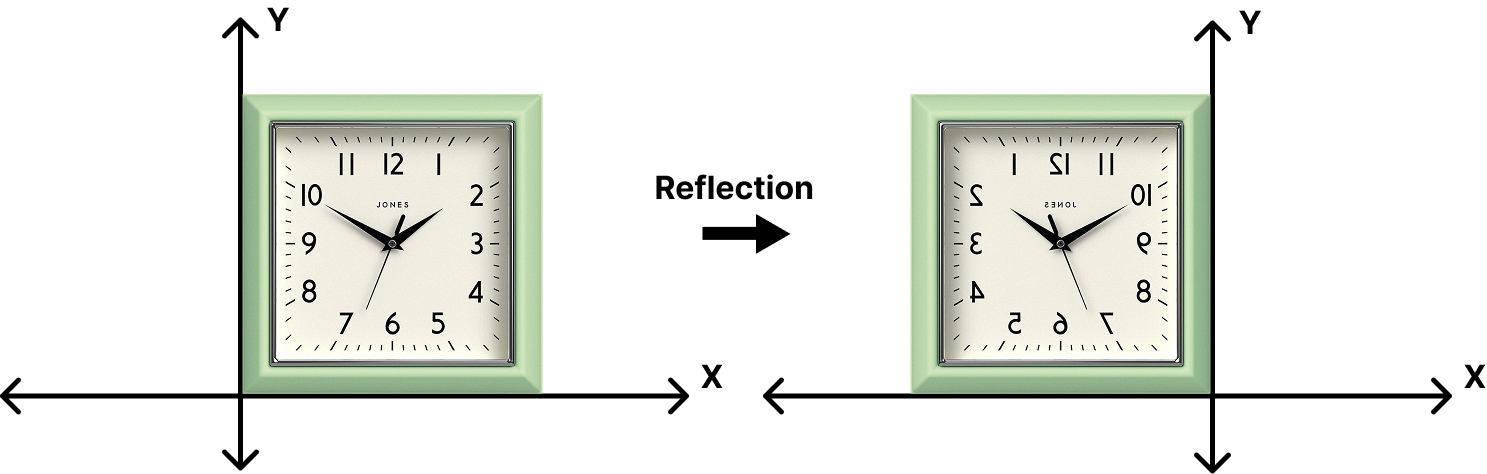 $$ \begin{bmatrix}x' \\ y'\end{bmatrix} = \begin{bmatrix}s_x & 0 \\ 0 & s_y\end{bmatrix}\begin{bmatrix}x \\ y\end{bmatrix} $$ ## Transformations: Reflection  $$ \begin{bmatrix}x' \\ y'\end{bmatrix} = \begin{bmatrix}-1 & 0 \\ 0 & 1\end{bmatrix}\begin{bmatrix}x \\ y\end{bmatrix} $$ ## Transformations: Rotation 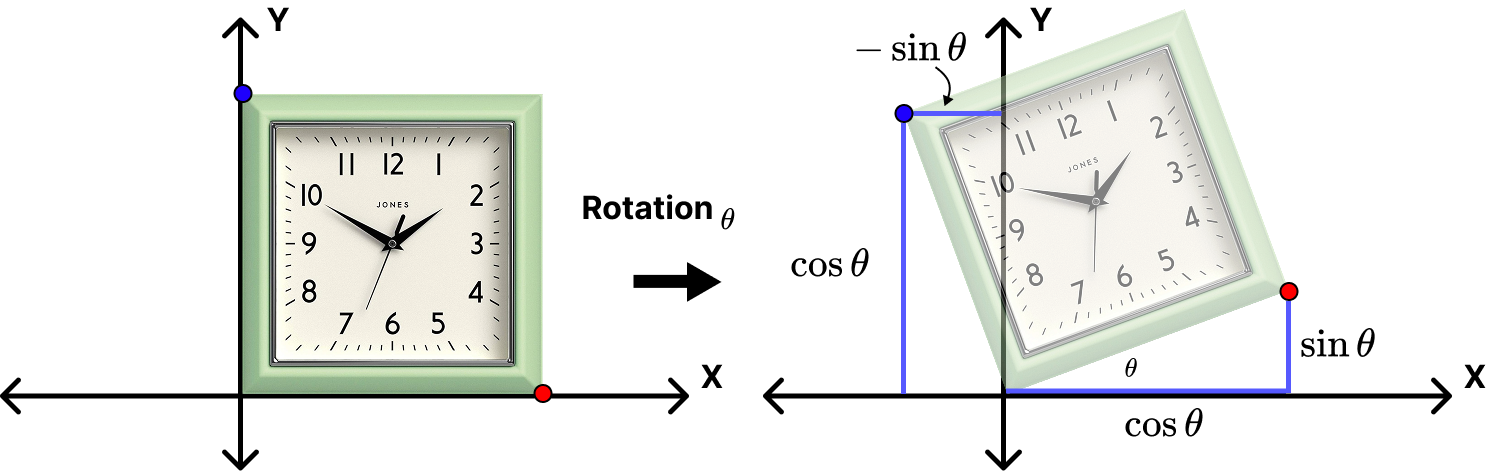 $$ R_\theta = \begin{bmatrix}\cos{\theta} & -\sin{\theta} \\ \sin{\theta} & \cos{\theta} \end{bmatrix} $$ ## Transformations: The Pattern $$ \begin{bmatrix}x' \\ y'\end{bmatrix} = \begin{bmatrix}a & b \\ c & d\end{bmatrix}\begin{bmatrix}x \\ y\end{bmatrix} $$ $$ x' = Mx $$ We generally try to minimize transformation operations by relying on single transformation matrix $M$.
### Multi-Step Operations We can perform multiple transformations (e.g. rotation, then scale) in sequence by using multiple $M$ matrices in sequence. **Matrix multiplications occur from right to left and are non-commutative!** $$ \begin{bmatrix}x' \\ y'\end{bmatrix} = \begin{bmatrix}a & b \\ c & d\end{bmatrix} \begin{bmatrix}e & f \\ g & h \end{bmatrix} \begin{bmatrix}x \\ y\end{bmatrix} $$ $$ x' = M_2M_1x $$ ## Transformations: Translations 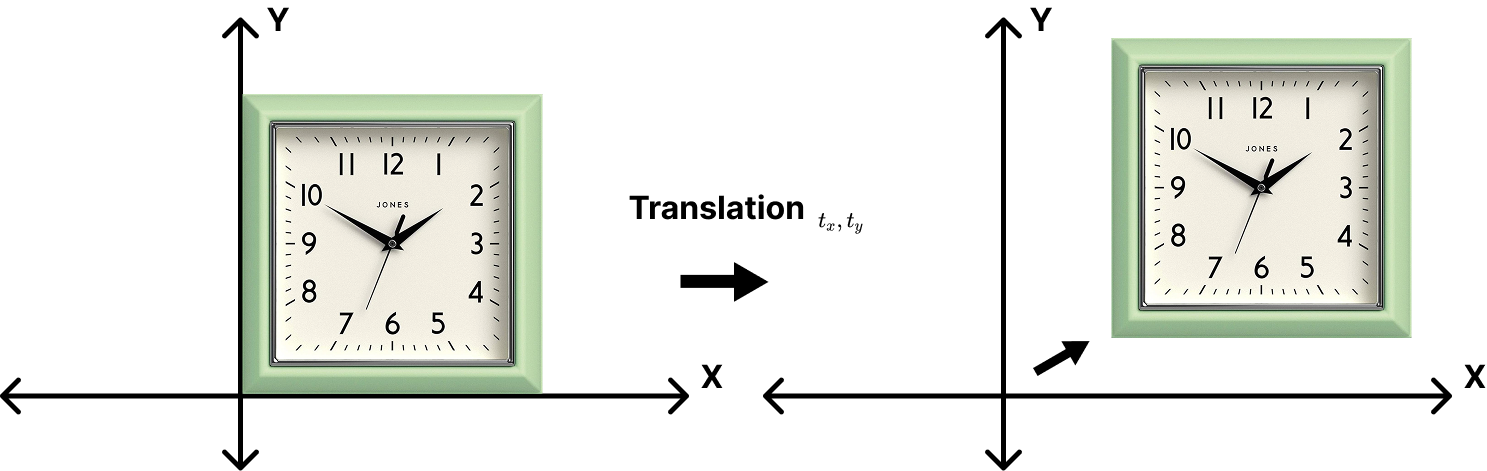 $$ \begin{bmatrix}x' \\ y'\end{bmatrix} =\begin{bmatrix}x \\ y\end{bmatrix} + \begin{bmatrix} t_x \\ t_y \end{bmatrix} $$ ## Translations Don't Match the Pattern - Translation cannot be represented in matrix form $$ \begin{bmatrix}x' \\ y'\end{bmatrix} = \begin{bmatrix}a & b \\ c & d\end{bmatrix} \begin{bmatrix}x \\ y\end{bmatrix} + \begin{bmatrix} t_x \\ t_y \end{bmatrix} $$ - Is there a unified way to represent all transformations? ## Solution: Homogeneous Coordinates - Add a 3rd coordinate (a $w$-coordinate) - 2D Point: $\begin{bmatrix}x \\ y \\ 1 \end{bmatrix}$ - 2D Vector: $\begin{bmatrix}x \\ y \\ 0 \end{bmatrix}$ - Matrix Operations now in Linear Form $$ \begin{bmatrix}x' \\ y' \\ w' \end{bmatrix} = \begin{bmatrix} 1 & 0 & t_x \\ 0 & 1 & t_y \\ 0 & 0 & 1 \end{bmatrix} \begin{bmatrix}x \\ y \\ 1 \end{bmatrix} = \begin{bmatrix} x + t_x \\ y + t_y \\ 1 \end{bmatrix} $$ ## 2D Transformations ### Scale $$ S(s_x,s_y)=\begin{bmatrix} s_x & 0 & 0 \\ 0 & s_y & 0 \\ 0 & 0 & 1 \end{bmatrix} $$ ### Rotation $$ R(\theta)=\begin{bmatrix} \cos{\theta} & -\sin{\theta} & 0 \\ \sin{\theta} & \cos{\theta} & 0 \\ 0 & 0 & 1 \end{bmatrix} $$ ### Translation $$ T(t_x,t_y)=\begin{bmatrix} 1 & 0 & t_x \\ 0 & 1 & t_y \\ 0 & 0 & 1 \end{bmatrix} $$ ## 3D Transformations We do the same thing that we did with 2D matrices: add _another_ column! This also means that transformations using homogeneous coordinates involves $4 \times 4$ matrices. - **3D point:** $(x, y, z, 1)^T$ - **3D vector:** $(x, y, z, 0)^T$ $$ \begin{bmatrix} x' \\ y' \\ z' \\ 1 \end{bmatrix} = \begin{bmatrix} a & b & c & t_x \\ d & e & f & t_y \\ g & h & i & t_z \\ 0 & 0 & 0 & 1 \end{bmatrix} \begin{bmatrix} x \\ y \\ z \\ 1 \end{bmatrix} $$ ## 3D Transformations: Scale and Translation ### Scale $$ S(s_x,s_y,s_z) = \begin{bmatrix} x' \\ y' \\ z' \\ 1 \end{bmatrix} = \begin{bmatrix} s_x & 0 & 0 & 0 \\ 0 & s_y & 0 & 0 \\ 0 & 0 & s_z & 0 \\ 0 & 0 & 0 & 1 \end{bmatrix} $$ ### Translation $$ S(s_x,s_y,s_z) = \begin{bmatrix} x' \\ y' \\ z' \\ 1 \end{bmatrix} = \begin{bmatrix} 0 & 0 & 0 & t_x \\ 0 & 0 & 0 & t_y \\ 0 & 0 & 0 & t_z \\ 0 & 0 & 0 & 1 \end{bmatrix} $$ ## 3D Transformations: Rotations We need to consider 3 axes rather than just a singular axis like in 2D... :::{.columns2} ::::{.column width="75%"} $$ R_x(\theta) = \begin{bmatrix} 1 & 0 & 0 & 0 \\ 0 & \cos{\theta} & -\sin{\theta} & 0 \\ 0 & \sin{\theta} & \cos{\theta} & 0 \\ 0 & 0 & 0 & 1 \end{bmatrix} $$ $$ R_y(\theta) = \begin{bmatrix} \cos{\theta} & 0 & \sin{\theta} & 0 \\ 0 & 1 & 0 & 0 \\ -\sin{\theta} & 0 & \cos{\theta} & 0 \\ 0 & 0 & 0 & 1 \end{bmatrix} $$ $$ R_z(\theta) = \begin{bmatrix} \cos{\theta} & -\sin{\theta} & 0 & 0 \\ \sin{\theta} & \cos{\theta} & 0 & 0 \\ 0 & 0 & 1 & 0 \\ 0 & 0 & 0 & 1 \end{bmatrix} $$ :::: ::::{.column width="25%"} 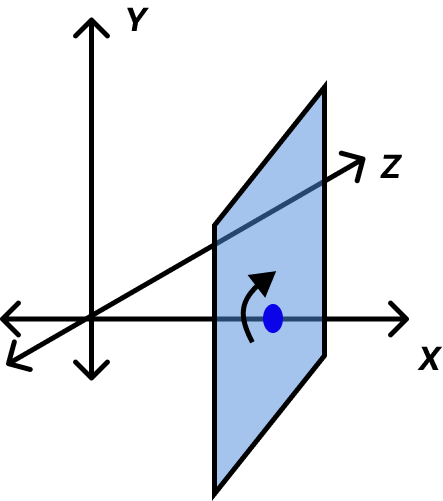{width="100%"} :::: ::: ## Applications: Model-View-Projection At its core, the task of rendering 3D data requires a kind of "pipeline" - a series of transformations from one "space" to another, in sequence: |1. World Space|2. View/Camera Space|4. Projection/Screen Space| |:-:|:-:|:-:| |Data points are placed within the 3D "world".|All points are transformed and are now relative to the camera's space.|All points are projected onto the 2D screen.| 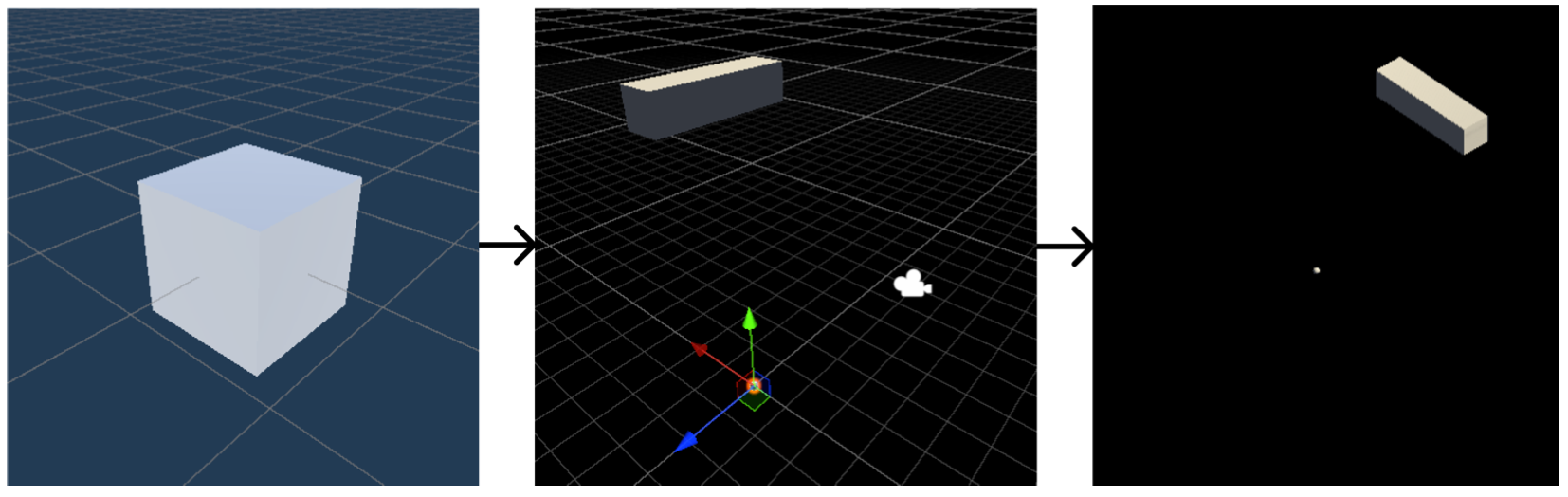{width="60%" fig-align="center"} ## Model-View-Projection Transformations 1. Find a good place to stand (**model** transformation) 2. Find a good "angle" to place the camera (**view** transformation) 3. Cheeese! (**projection** transformation) This **MODEL-VIEW-PROJECTION** operation is instrumental to all graphics libraries, render engines, etc. 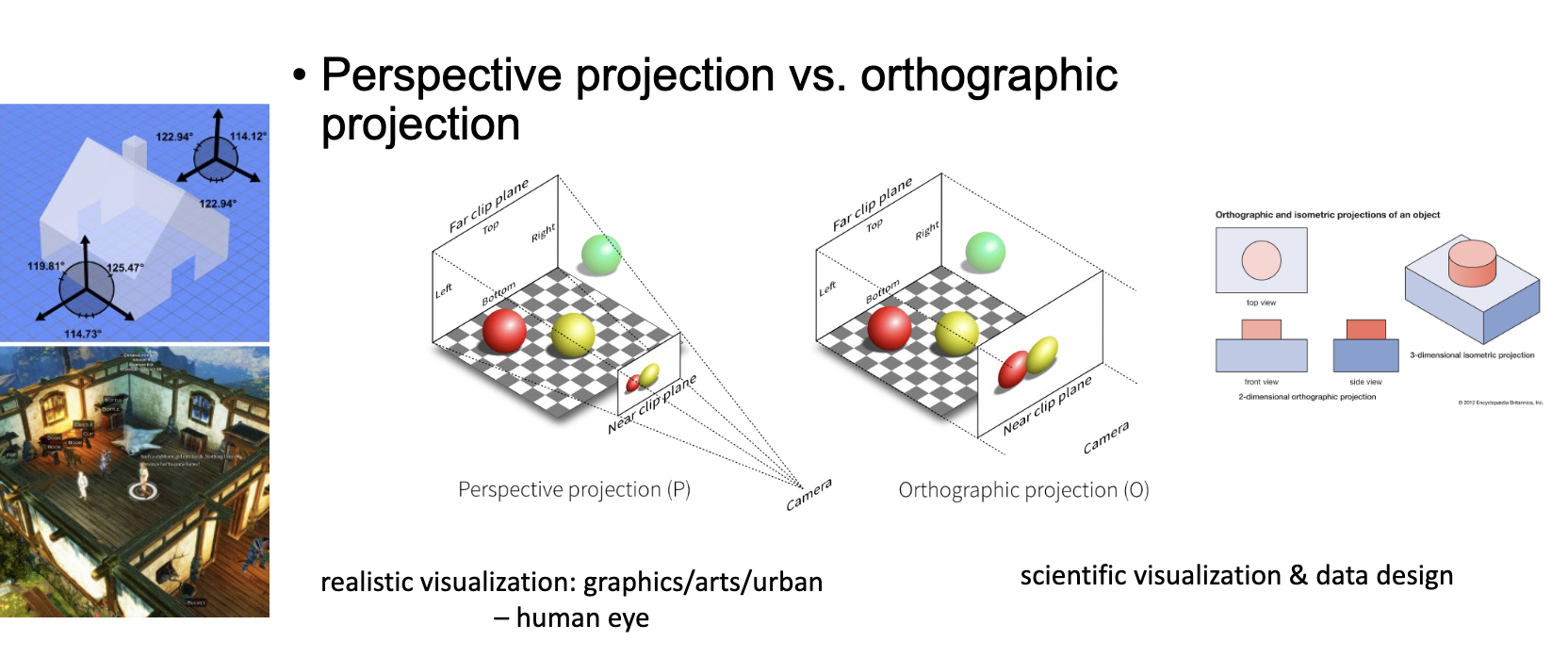{width="60%" fig-align="center"}