Foundations of Geovisualization

The 2D Map - CS-GY 6313 - Fall 2026

Claudio Silva

2026-10-23

Foundations of Geovisualization

The 2D Map

Part 1: The Power of Spatial Analysis

John Snow’s 1854 Cholera Map

What is a map for?

  • Analysis
  • Communication

Snow’s Innovation:

  • He didn’t just plot data
  • He used spatial relationships to solve a problem
  • Deaths clustered around the Broad Street pump
  • Had the handle removed → outbreak stopped

John Snow’s Cholera Map showing death locations and water pumps

Historical Milestones in Cartography

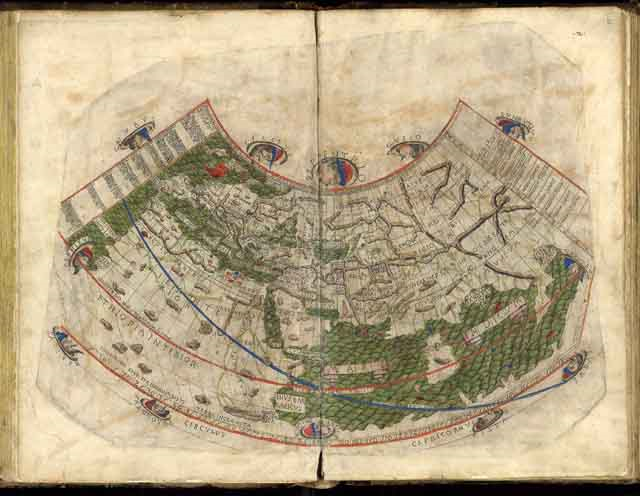
Ptolemy’s Geographica (c. 150 AD)

  • Foundation of modern cartography
  • Latitude and longitude coordinate system
  • Over 2000 years of influence

Ptolemy’s World Map

Minard’s Flow Map (1869)

  • Multiple variables in one visualization:
    • Troop size (width)
    • Temperature (bottom scale)
    • Location (geography)
    • Direction (color: tan = advance, black = retreat)
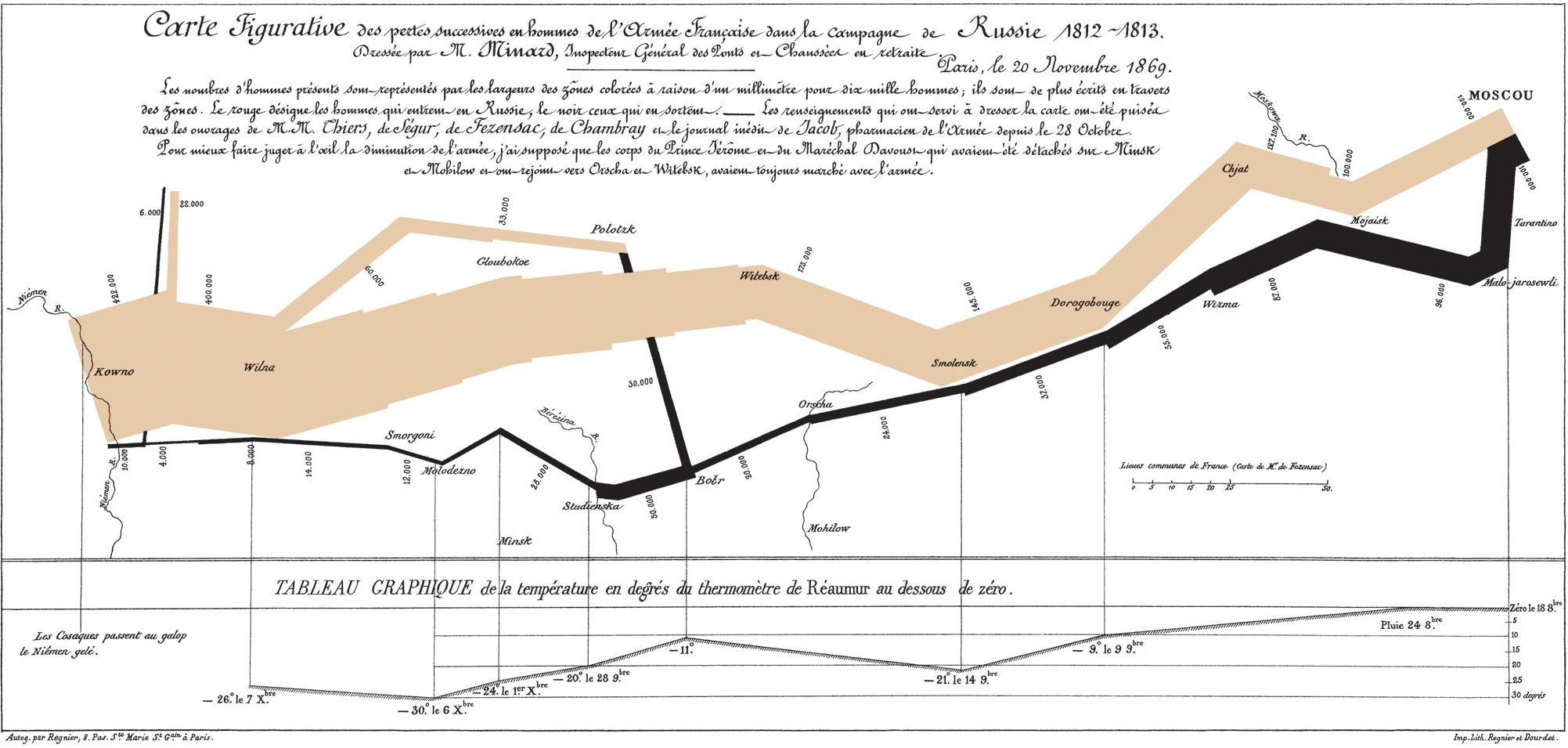
Minard’s Map of Napoleon’s Russian Campaign

Part 2: When to Use a Map?

The Critical Question

“Not all geographical data should be on a map.”

When is the bar chart better?

  • For ranking and lookup tasks
  • “Which city has the highest sales?”
  • “What are the top 5 cities?”

When is the map better?

  • For finding spatial patterns
  • For identifying clusters
  • For understanding geographic relationships
  • “Are sales clustered along the Front Range?”

Map vs. Bar Chart: The Same Data

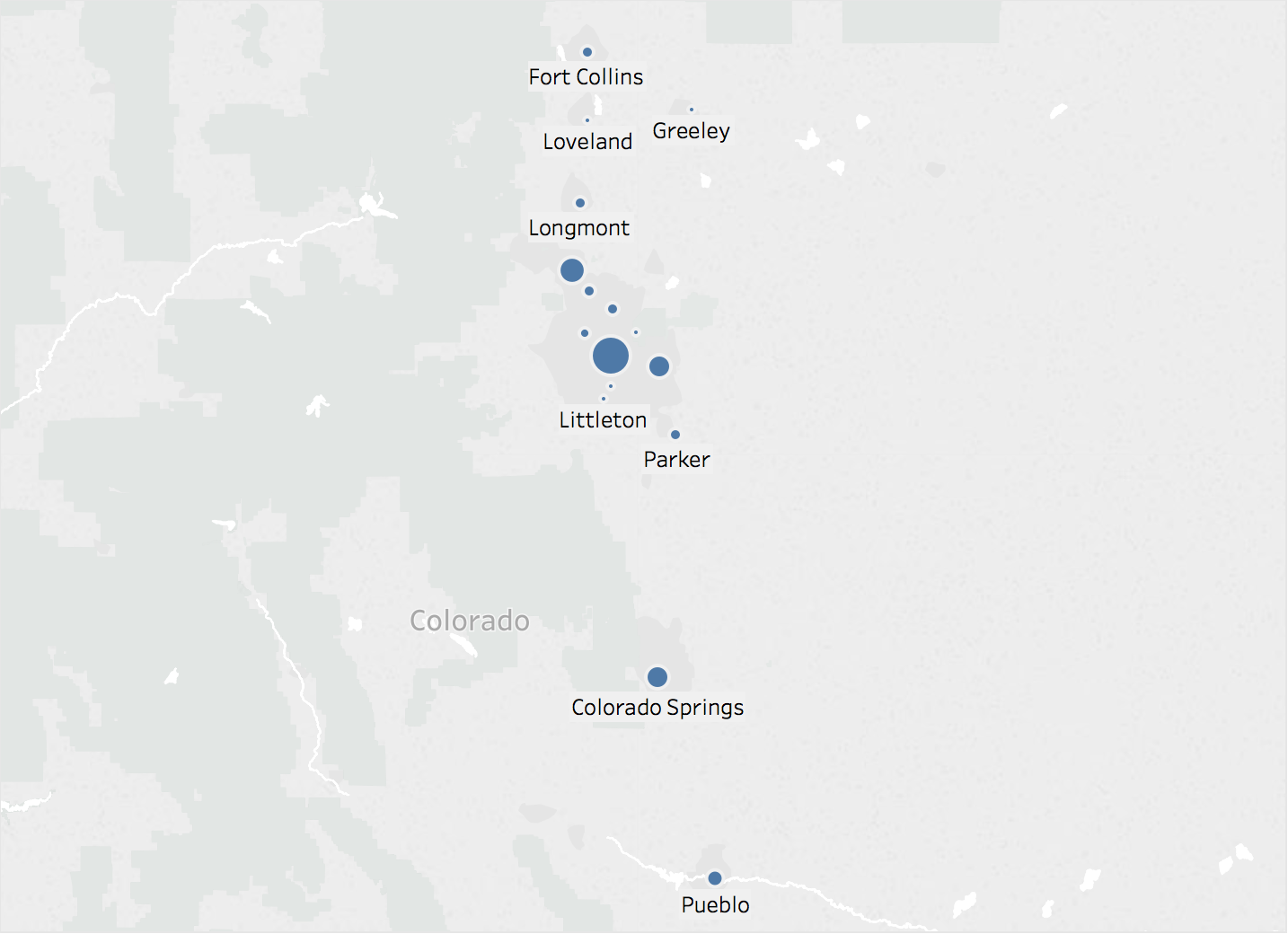
Map of Colorado cities, symbols sized by sales

Better for: Spatial patterns, regional clustering
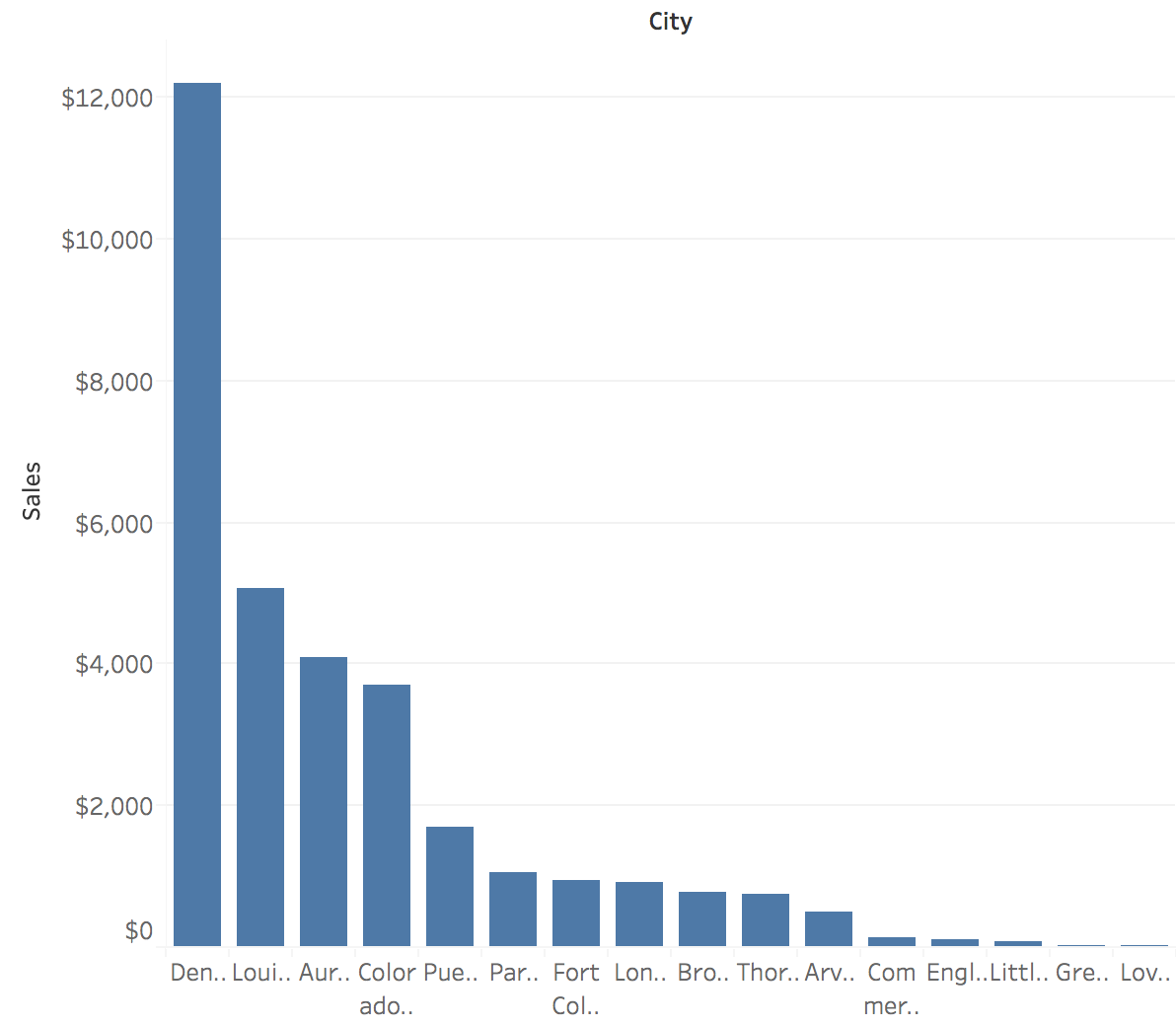
Bar chart of sales by city, sorted

Better for: Ranking, exact value lookup

Part 3: The Fundamental Problem

Projections: Mapping 3D to 2D

The Challenge:

  • Earth is a 3D sphere
  • Screens and paper are 2D planes
  • You cannot flatten a sphere without distortion

You must choose what to distort:

  • Shape
  • Area
  • Distance

Diagram showing sphere unpeeling onto flat surface

Any 2D map is a lie. The question is: what kind of lie?

Projection Types: What They Preserve

Conformal

Preserves shape & angles
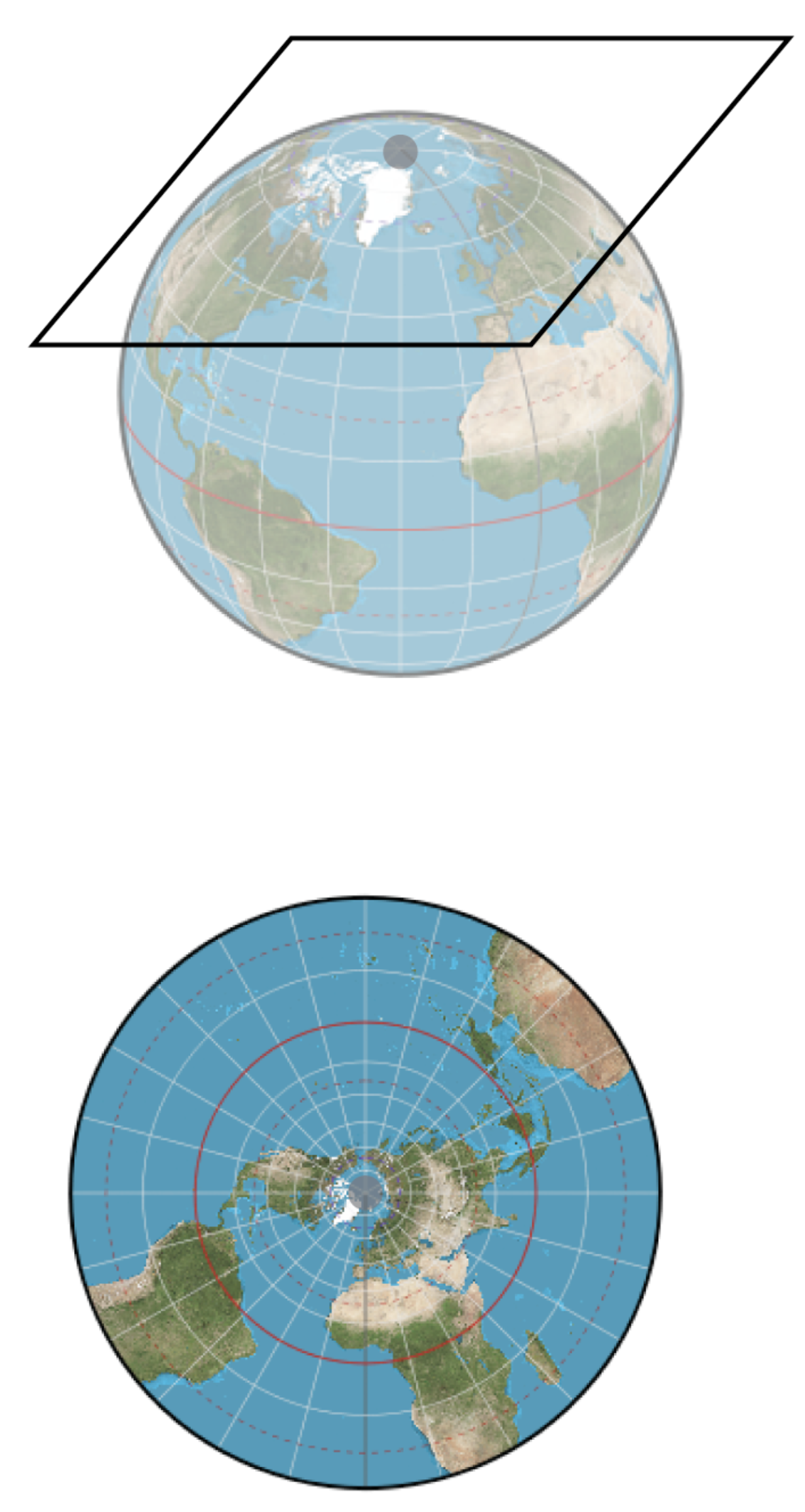
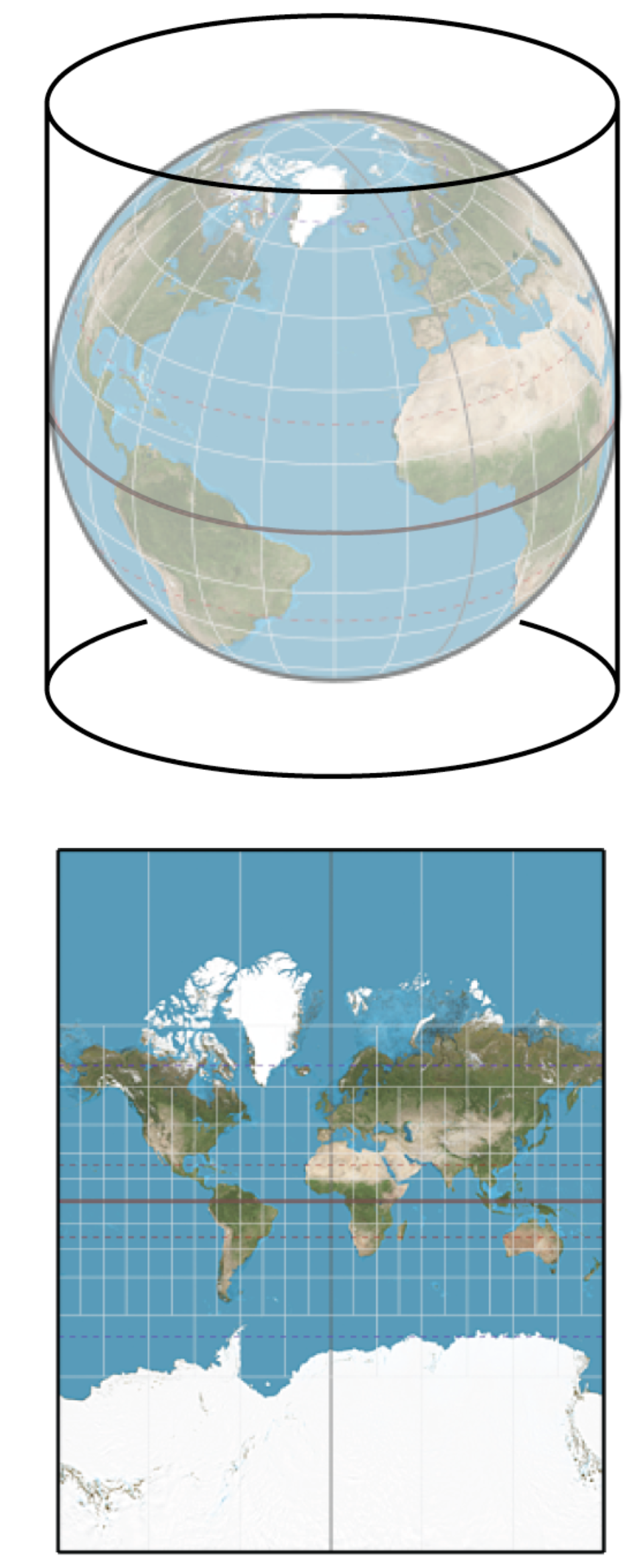
Mercator projection

Use: Navigation (constant compass bearing)

Equal-Area

Preserves relative area
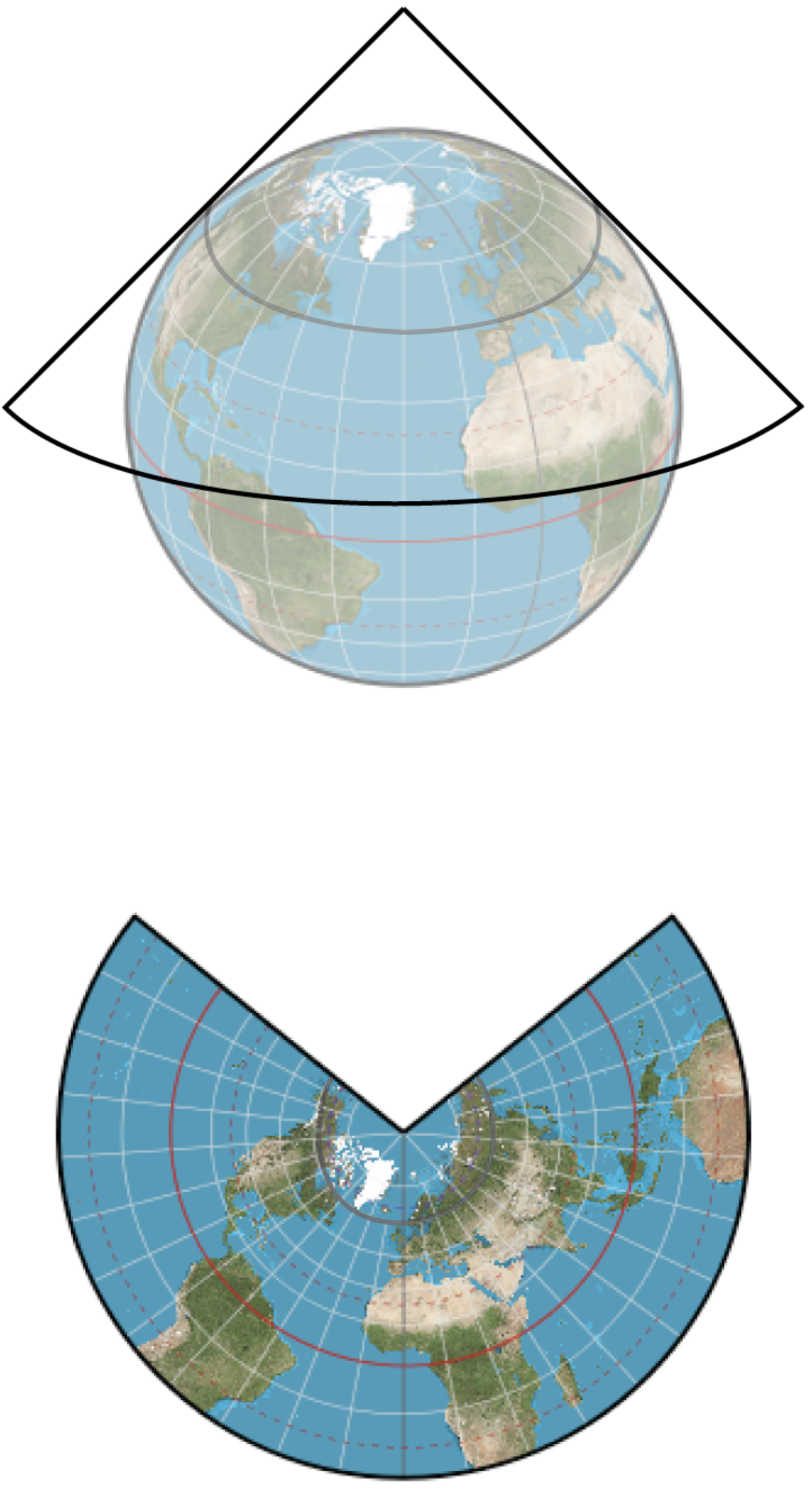
Albers Equal-Area projection

Use: Thematic maps (choropleths)

Equidistant

Preserves distance from center
Azimuthal Equidistant projection

Use: Distance calculations

Tissot’s Indicatrix: Visualizing Distortion

Mercator (Conformal)
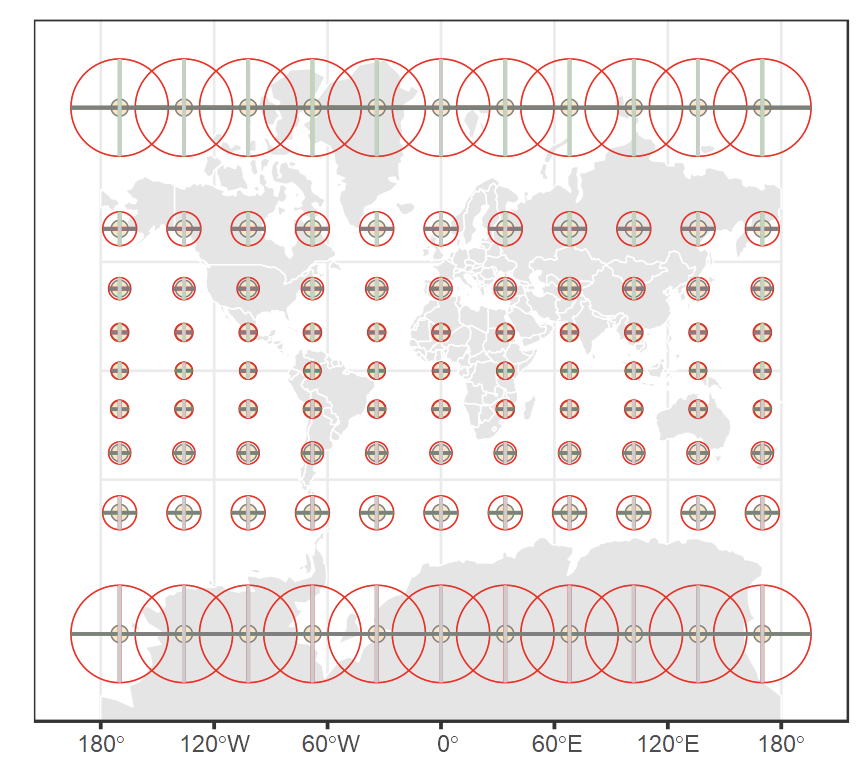
Tissot circles on Mercator projection
  • Circles remain circles (shape preserved)
  • But circles get huge near poles (area distorted)

Equal-Area
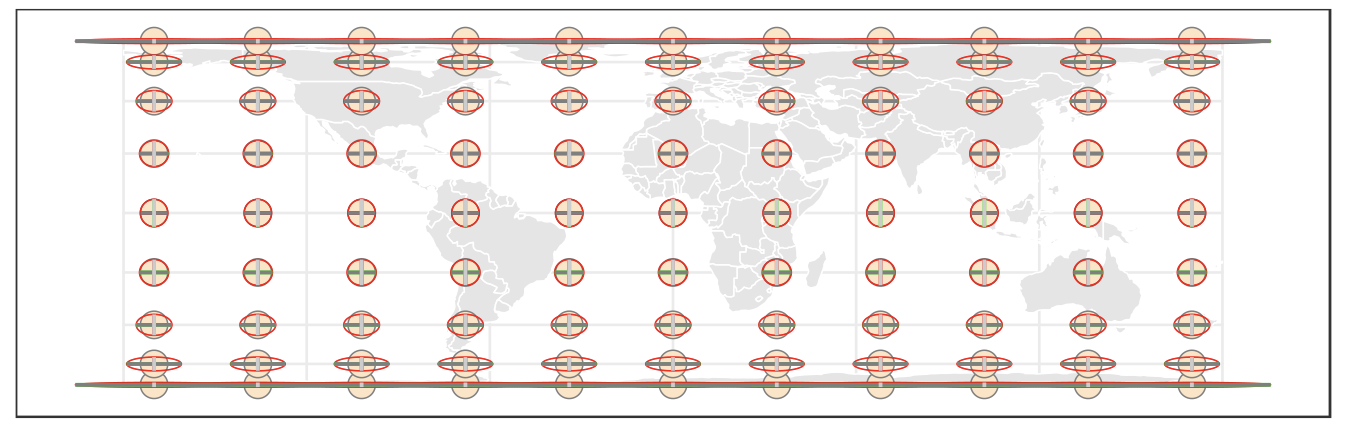
Tissot circles on equal-area projection
  • Circles become ellipses (shape distorted)
  • But all have same area (area preserved)

Projection Hall of Shame/Fame

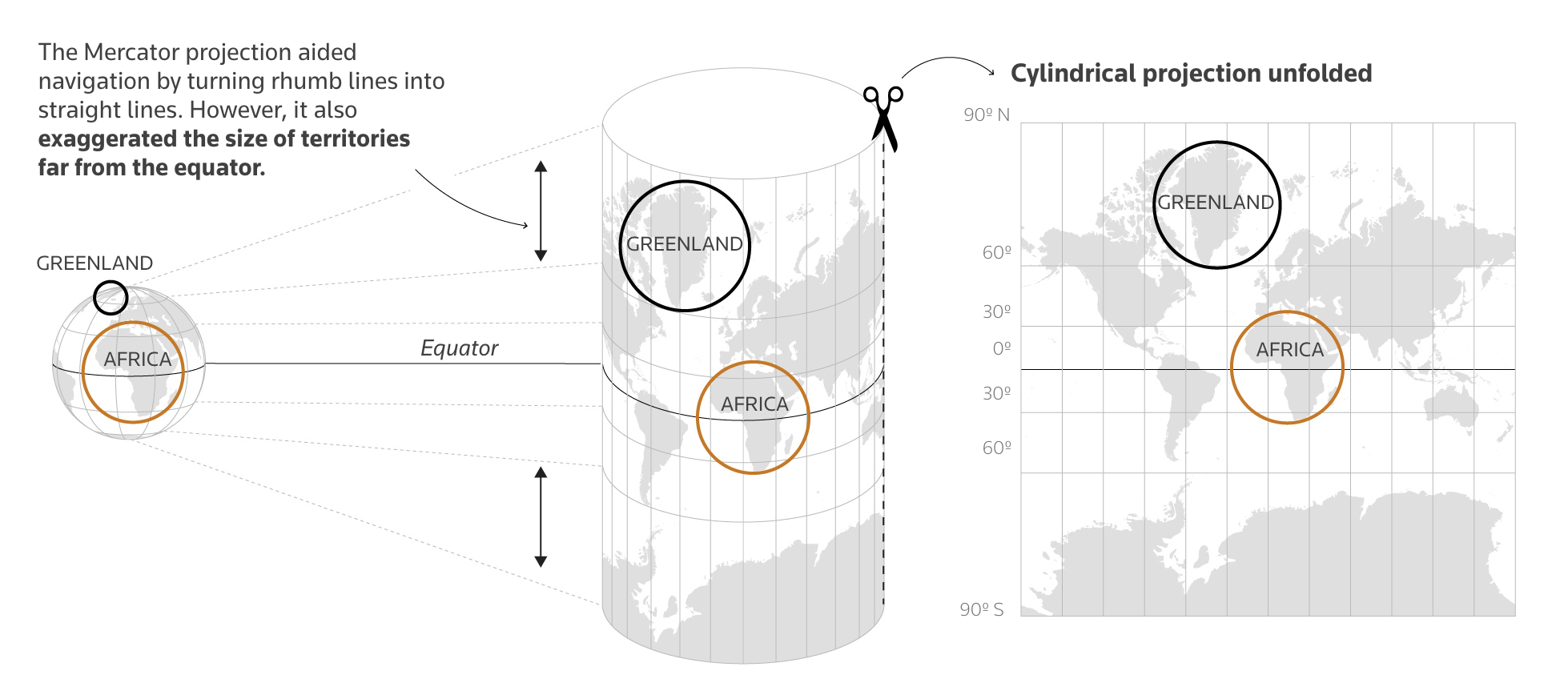
Mercator: The Infamous Example
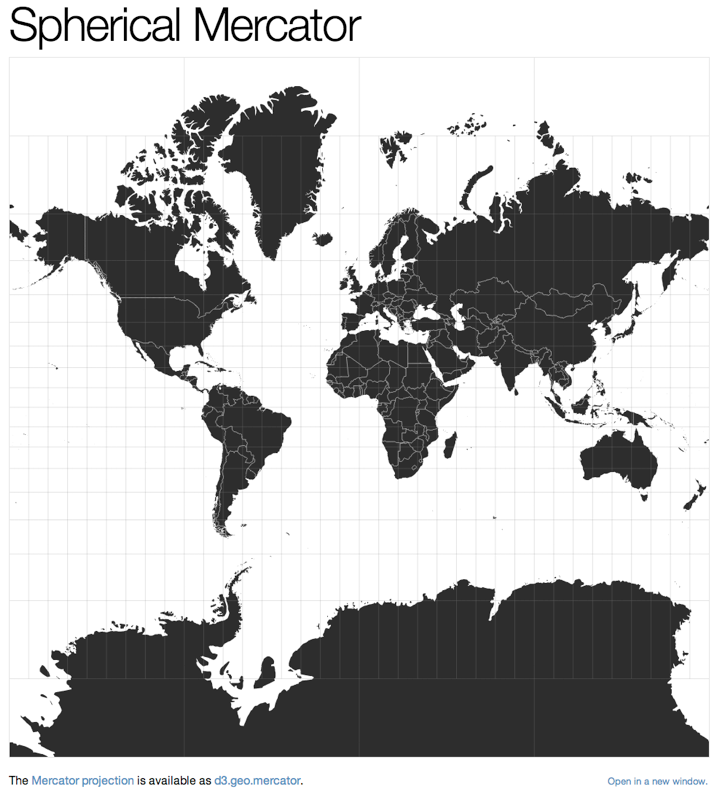
Mercator showing Greenland vs Africa

The Problem: Greenland looks bigger than Africa

Reality: Africa is 14× larger than Greenland

Albers Equal-Area: The Fix
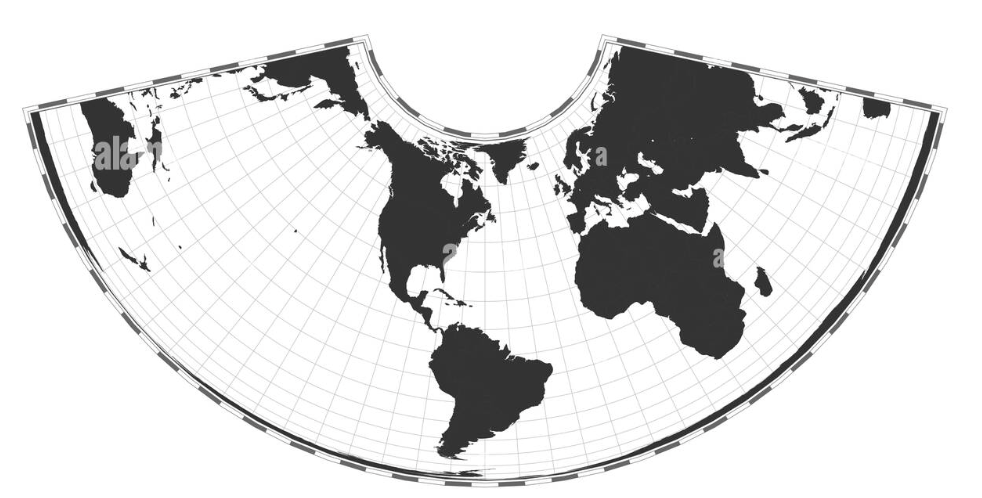
Albers projection showing true relative sizes

The Solution: Use equal-area for thematic maps

Rule: If you shade areas, you MUST use an equal-area projection.

The True Size of Countries

Understanding Mercator Distortion

How Mercator exaggerates territories far from the equator

Part 4: Taxonomy of Thematic Maps

Type 1: Choropleth Map

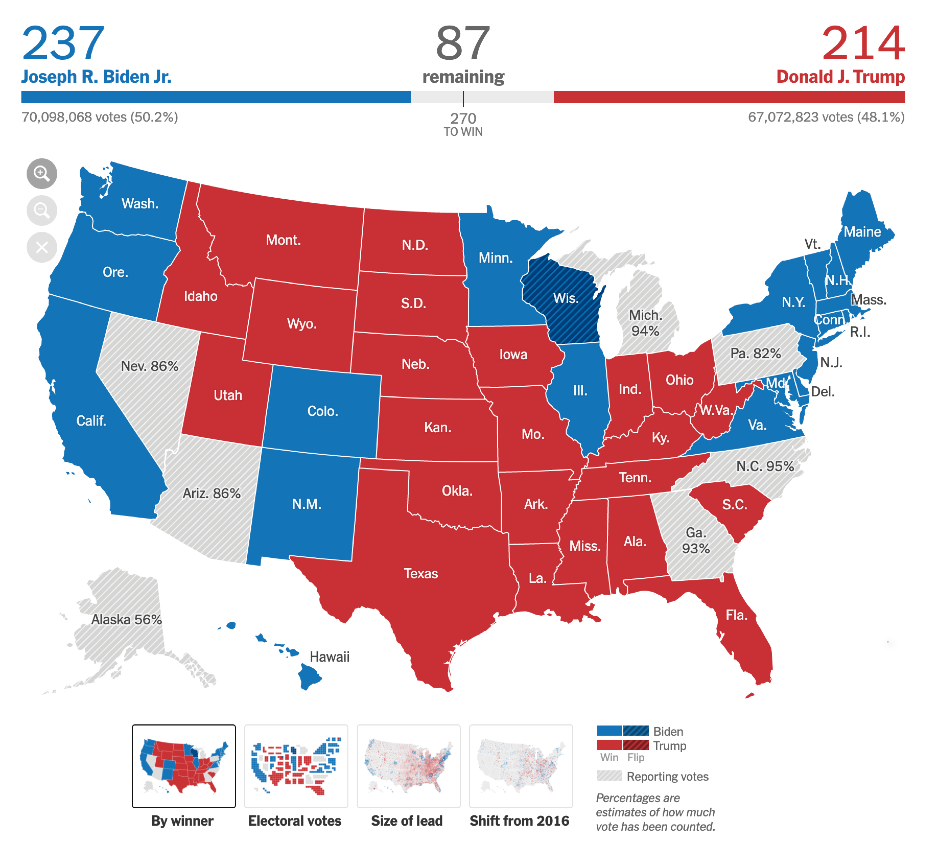
NYT 2020 Election: By Winner (choropleth)

Definition:

Regions are shaded based on a value

Use Cases:

  • Categorical data (winner/loser)
  • Rates and percentages
  • Density measures

Good for: Seeing broad regional patterns

Type 2: Proportional Symbol Map
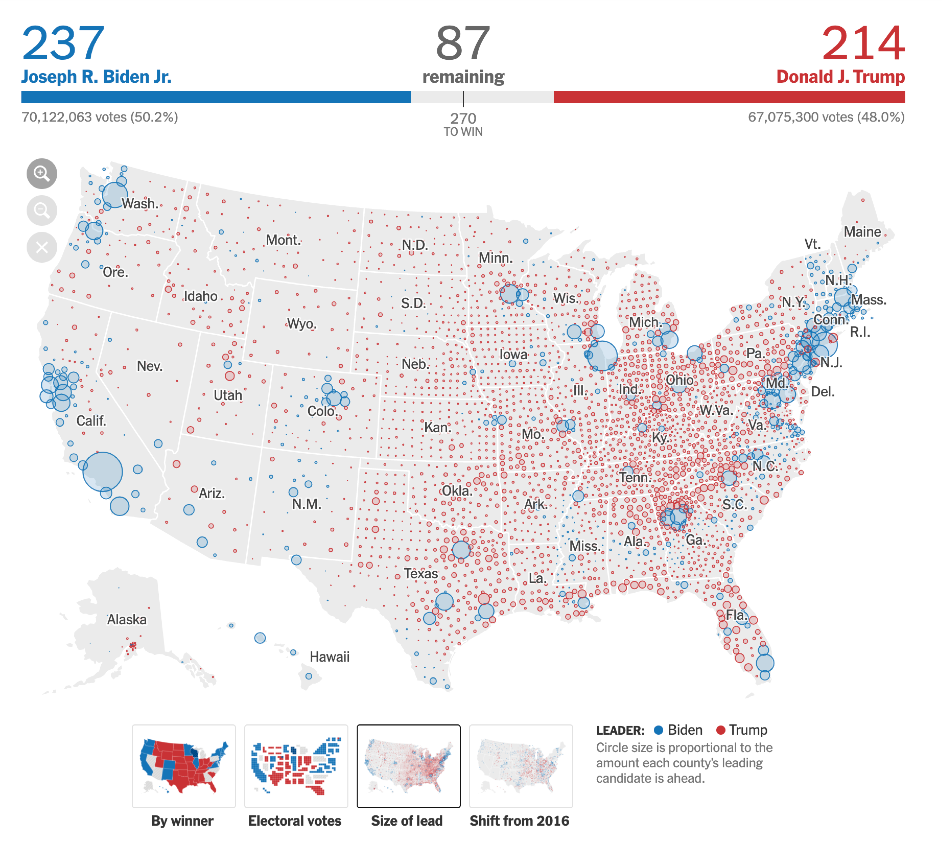
NYT 2020 Election: Size of Lead (proportional symbols)

Definition:

Symbols (e.g., circles) are scaled based on a value

Use Cases:

  • Absolute quantities
  • Magnitude comparisons
  • Population distributions

Good for: Showing where the values are, not just the land area

Type 3: Cartogram
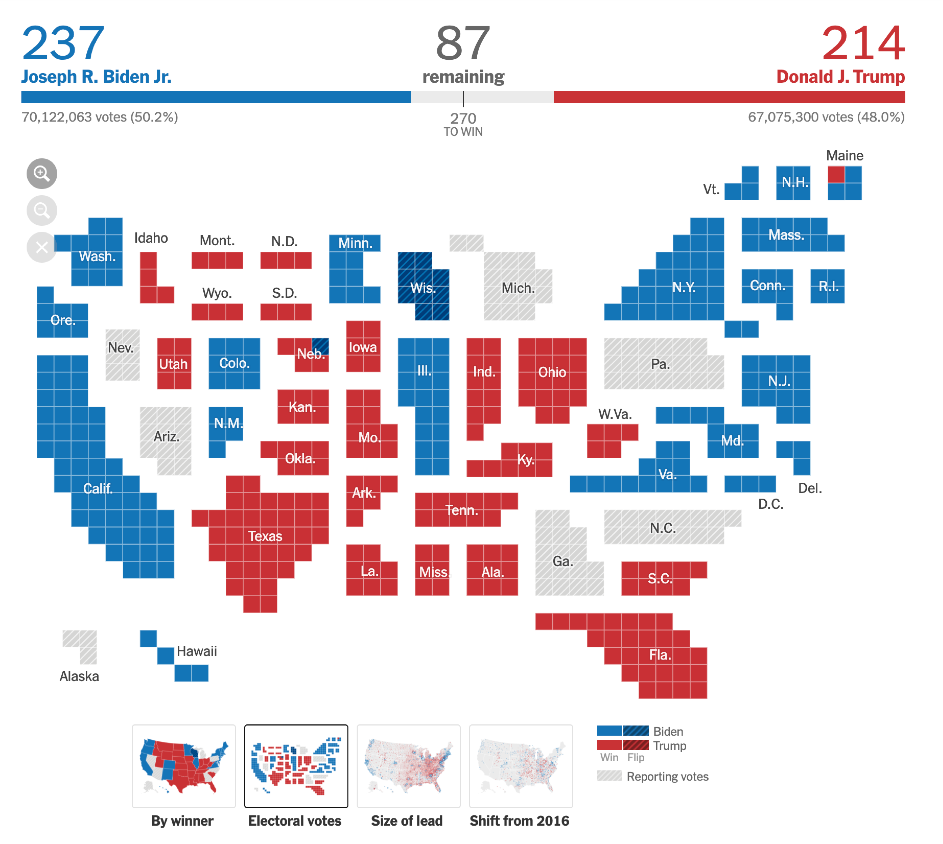
NYT Electoral College Cartogram (one square = one electoral vote)

Definition:

Geometry (area) is distorted to represent a quantity

Use Cases:

  • Population-based metrics
  • Electoral votes
  • Economic measures

Good for: De-emphasizing misleading land area

Type 4: Flow Map
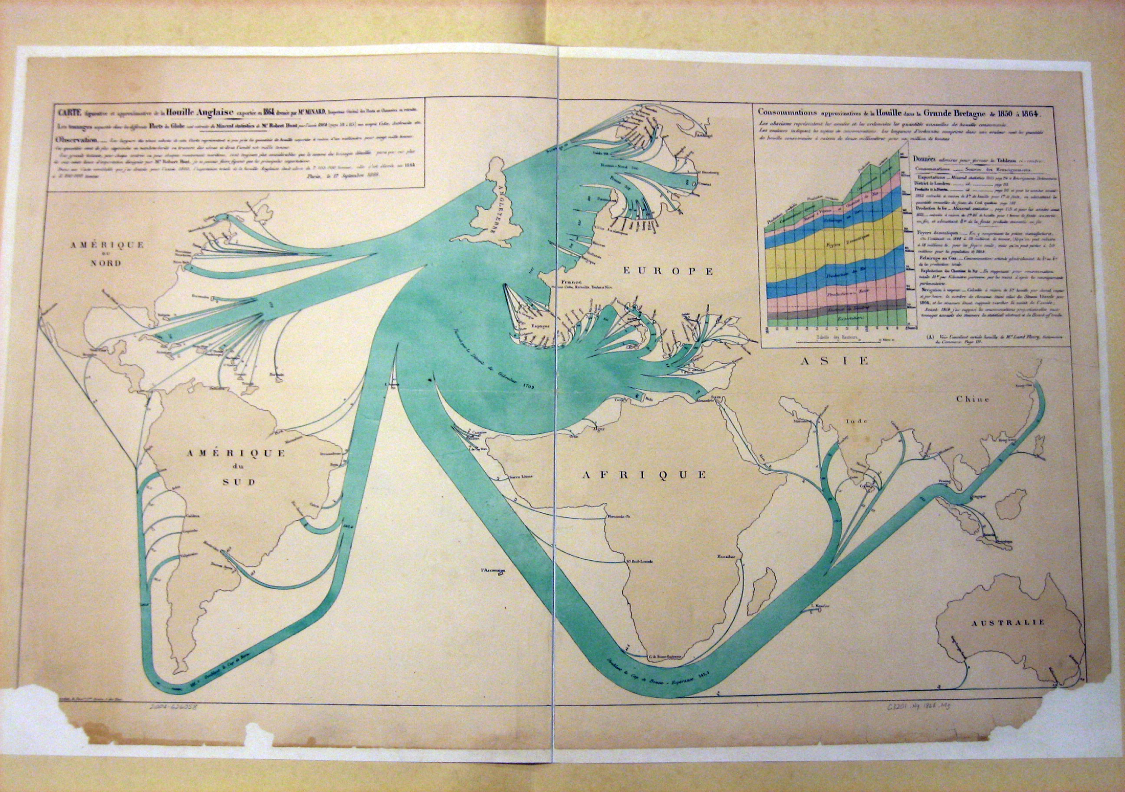
Minard’s British Coal Exports (1864)

Definition:

Shows movement or connections between regions

Use Cases:

  • Trade routes
  • Migration patterns
  • Transportation networks

Visual encoding: Line width ∝ quantity flowing

Part 5: Four Critical Pitfalls

Choropleth Maps: Handle with Care

Choropleth maps are the most common and most misused type of map.

Four Major Pitfalls:

  1. Normalization (Base Rate Bias)
  2. Classification (Binning)
  3. Color
  4. Geography (MAUP)

⚠️ Avoid these traps to create honest visualizations ⚠️

Pitfall 1: Normalization

The Base Rate Bias Problem

NEVER USE RAW COUNTS ON A CHOROPLETH MAP

A map of “Total Crimes” is just a map of “Total People”

You MUST normalize your data:

  • Per Capita (e.g., crimes per 1,000 people)
  • Density (e.g., crimes per square mile)
  • Rate (e.g., unemployment rate, percentage)

Projection Distortion: An Example

Equirectangular
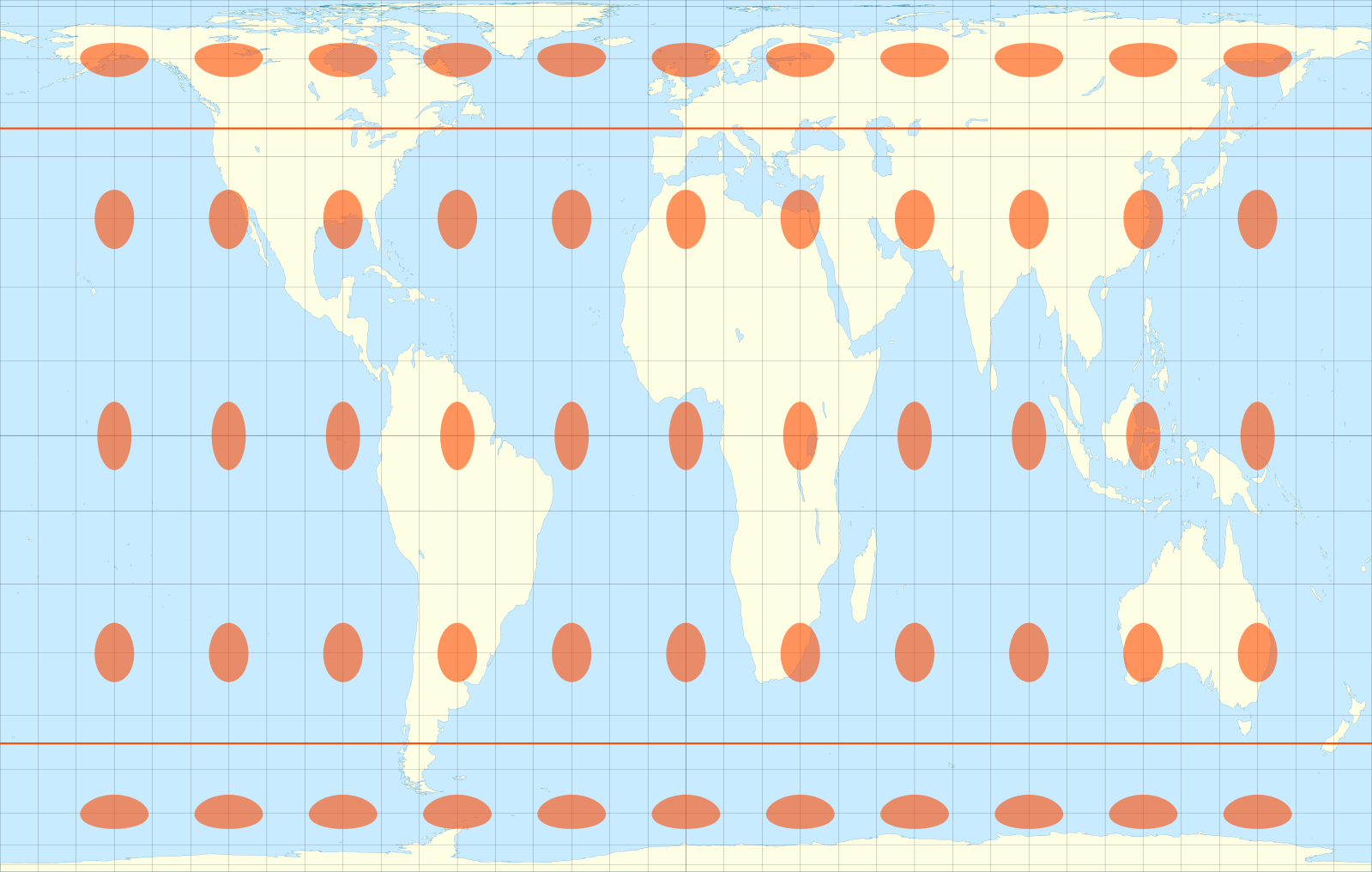
Same circles on an equirectangular projection

What we see: Evenly spaced, but circles stretch into ellipses

Mercator
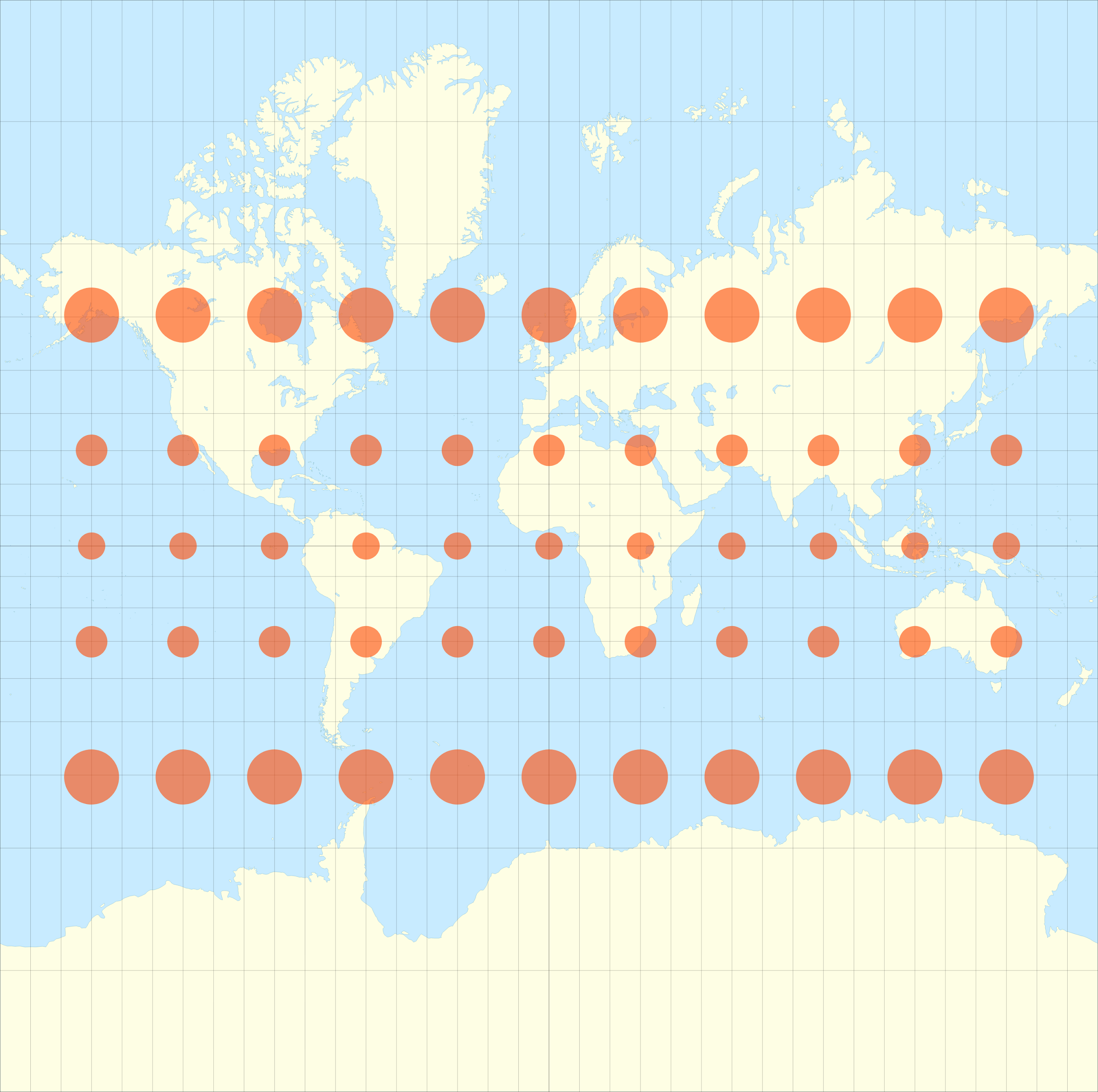
Same circles on Mercator: sizes vary with latitude

What we see: Same circles, sizes vary dramatically by latitude

The same principle applies to data: you must normalize to avoid misleading comparisons.

Pitfall 2: Classification (Binning)

How You Map Values to Color Changes the Story

Same data, same gradient. Only the color stops move.

  • Min / Max: color is linear in the value. Honest about size, but skewed data look uniformly pale; only outliers stand out

  • Median, quartiles, deciles: stops pinned at percentiles. Contrast goes to the crowded 4–8% middle; the map shows rank, and outliers disappear

Continuous scales, not bins. Classing is next.
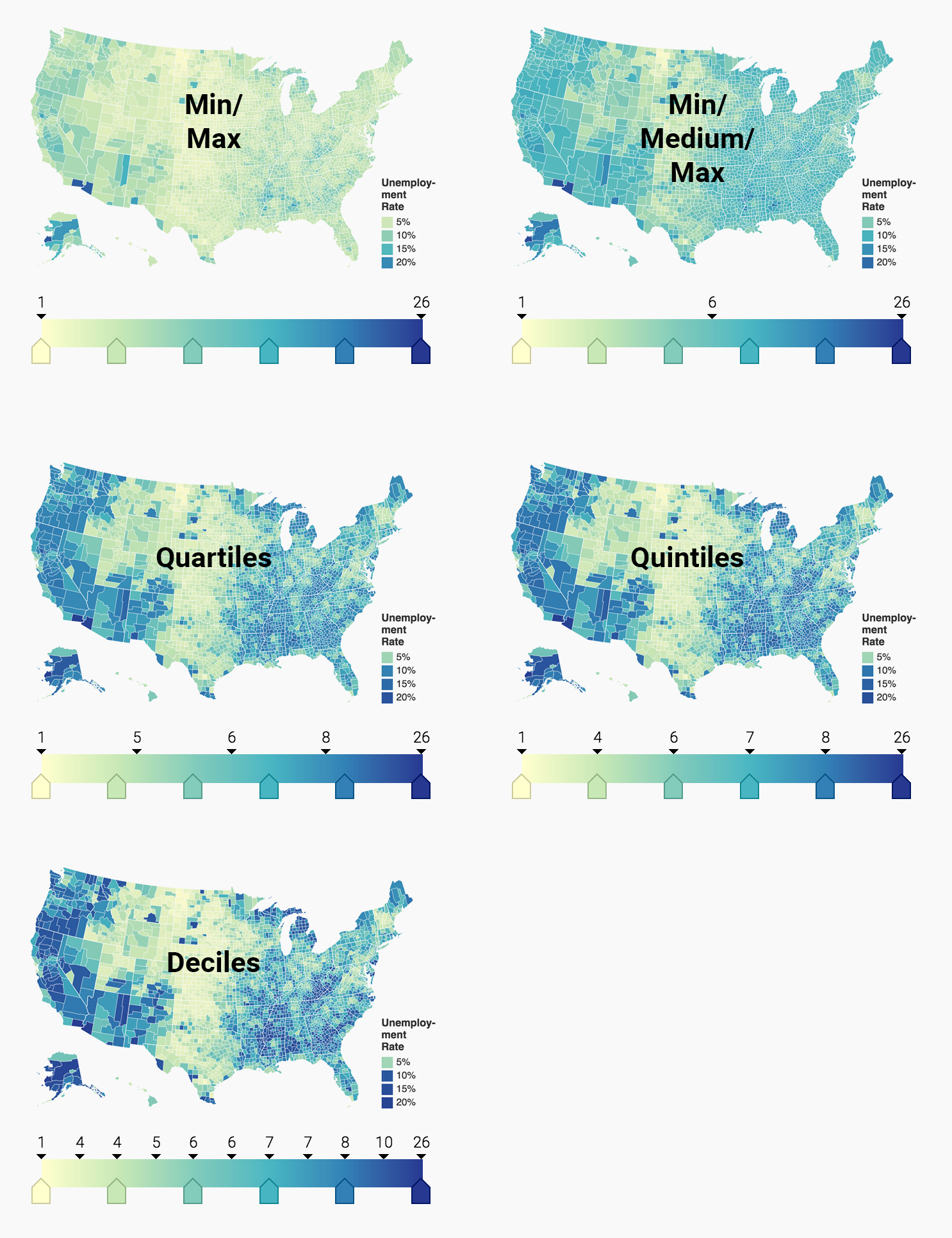
County unemployment rate, same data, five color-stop placements

BirdVis: The Same Problem, Over Time

One color range can’t serve both dates: 0–0.7 shows May, 0–0.1 shows September.
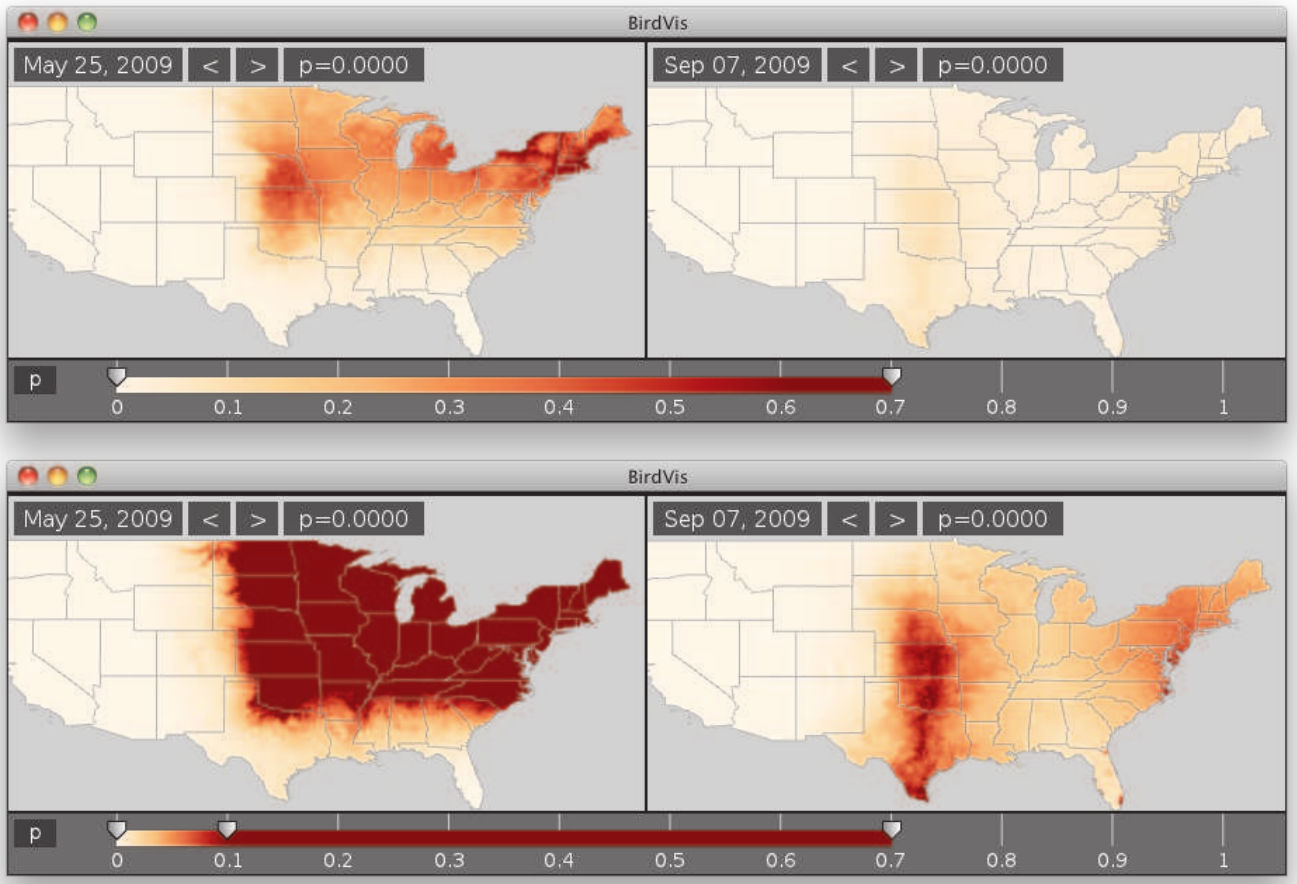
BirdVis occurrence probability for the Baltimore Oriole, May 25 and Sep 7, 2009, under two colormap settings

Classing: Same Data, Same Colors, Three Breaks

Five classes each. Only the break values change.
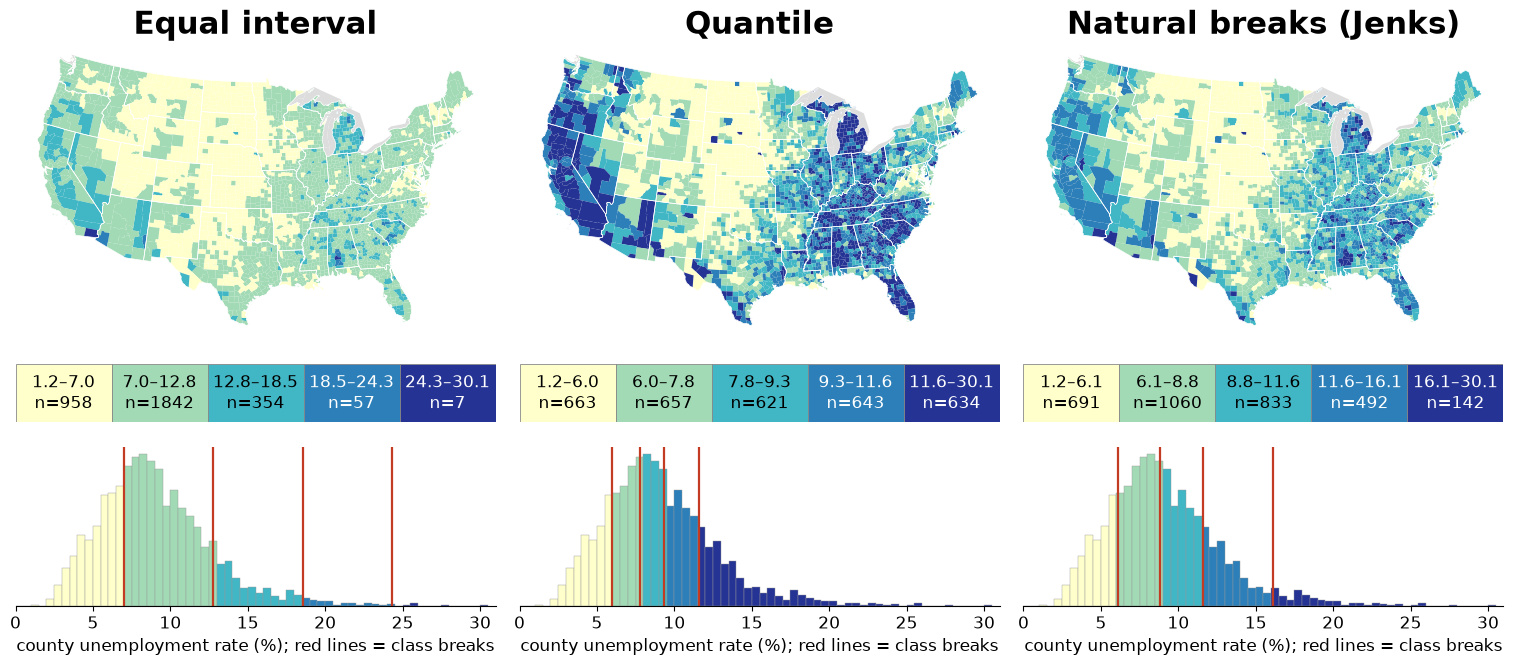
County unemployment rate (≈2009, BLS LAUS) classed three ways; histograms show where each method puts its breaks

Classification Methods Compared

Method Best For Pitfall
Equal Interval Evenly distributed data Dominated by outliers
Quantile Ranking & comparison Hides natural clustering
Natural Breaks Data with natural groups Can be arbitrary with uniform data
Manual Expert knowledge Subjective, hard to defend

Key Takeaway

There is no single “right” method, but you must be aware of your choice and able to defend it.

Pitfall 3: Color

Stop Using Rainbow Color Scales

❌ BAD: Rainbow

Map with rainbow color scale
  • Not perceptually uniform
  • No intuitive order (is yellow > green?)
  • Creates false boundaries
  • Misleading visual jumps

✓ GOOD: Sequential

Map with proper sequential scale

✓ GOOD: Diverging

Map with diverging scale

Real Data: What the Rainbow Hides

Same county unemployment data, three scales. Bottom row: lightness only.
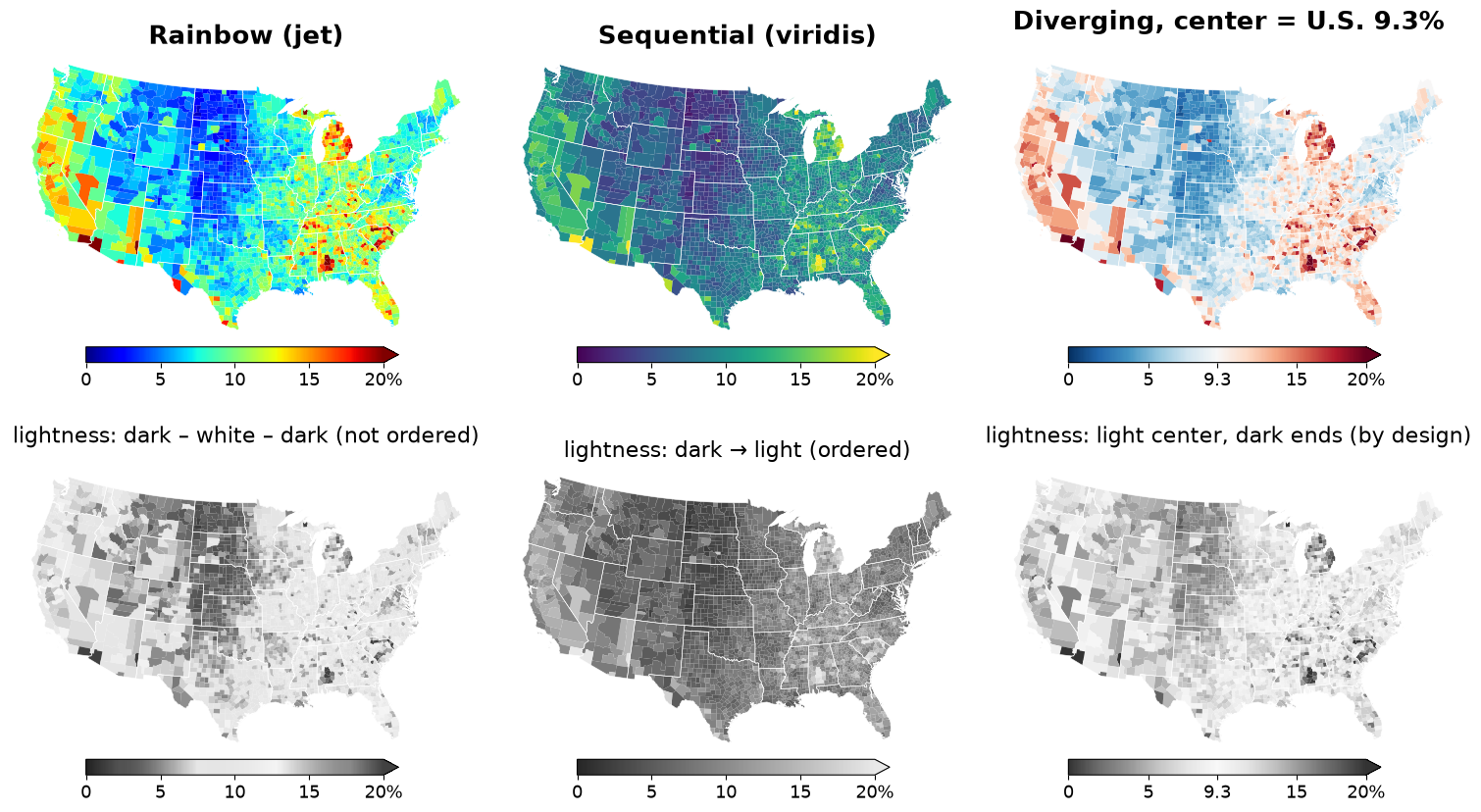
County unemployment rate (≈2009) in rainbow (jet), viridis and a diverging scale centered on the 2009 U.S. rate; bottom row keeps only each map's lightness (CIE L*)

Choose the Right Color Scale

Sequential (Light → Dark)

For data from low to high with no meaningful middle:

  • Population density
  • Income levels
  • Temperature (0-100°F)

Examples: Viridis, Blues, YlOrRd

Diverging (Color A → Neutral → Color B)

For data with a meaningful midpoint:

  • Above/below average
  • Gain/loss
  • Pro/con

Examples: RdBu (Red-White-Blue), BrBG, PiYG

Use ColorBrewer

colorbrewer2.org provides perceptually-uniform, colorblind-safe palettes

Pitfall 4: Geography (MAUP)

The Modifiable Areal Unit Problem

Large, sparse regions visually dominate small, dense regions
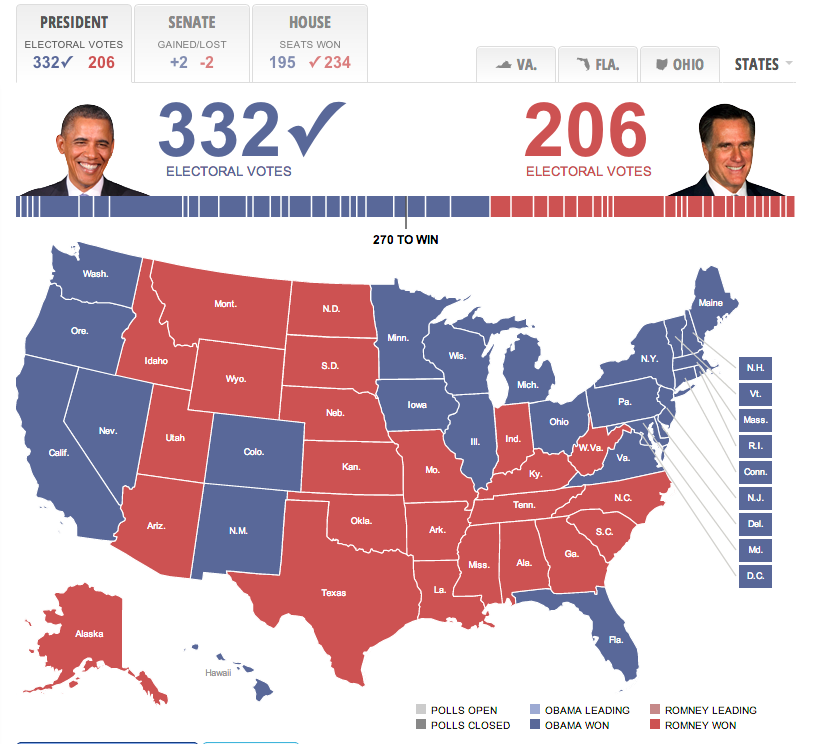
2016 Election map looking “all red”

The Problem:

  • Your eyes are drawn to area, not value
  • Rural counties: few people, huge land area
  • Urban counties: millions of people, tiny area
  • This map shows land area colored by votes, not votes

Solutions to the Geography Problem

❌ Misleading
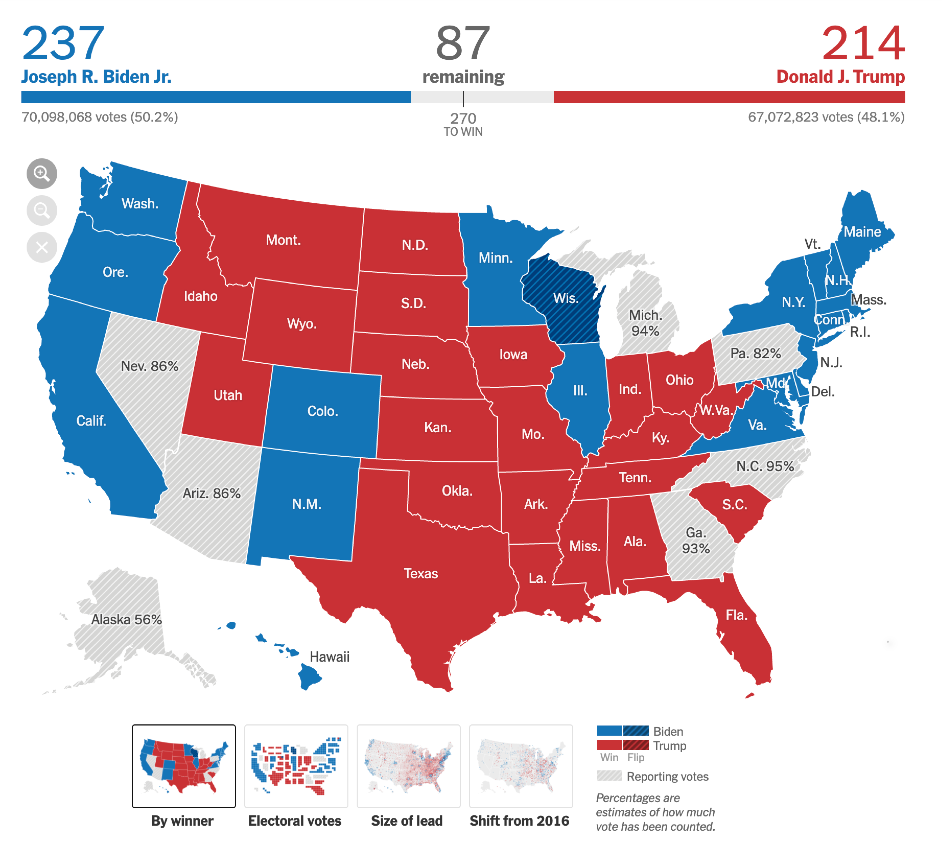
Standard choropleth

Land area dominates

✓ Solution 1: Symbols
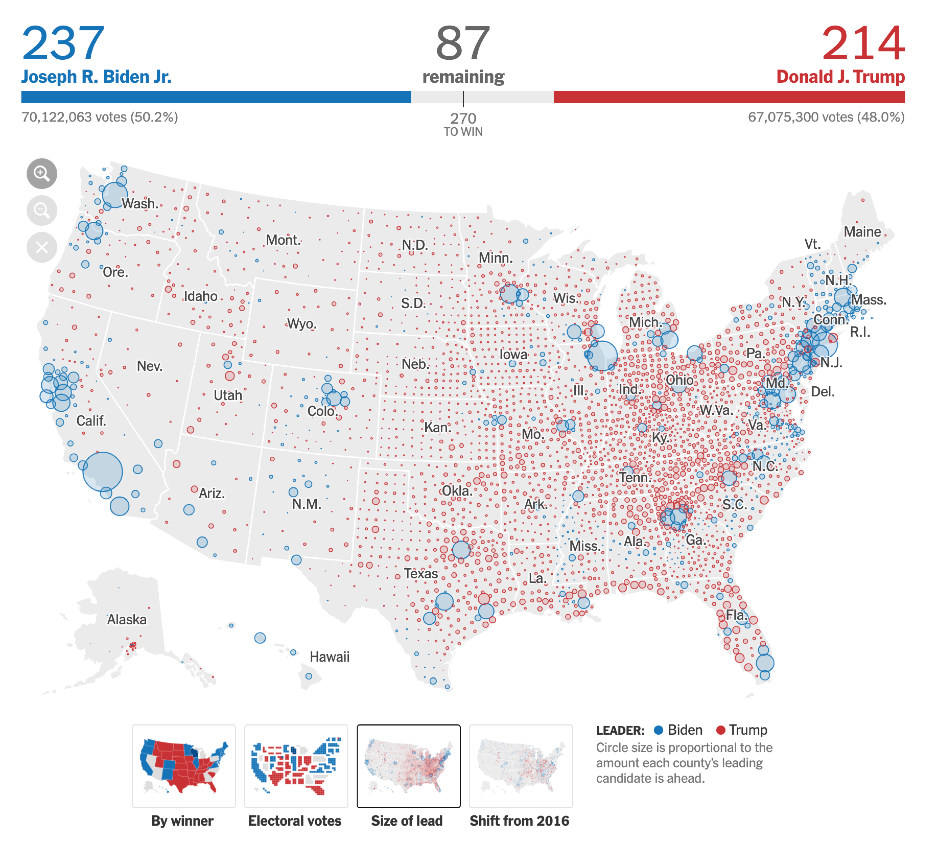
NYT Size of Lead symbol map

Shows where votes are

✓ Solution 2: Cartogram
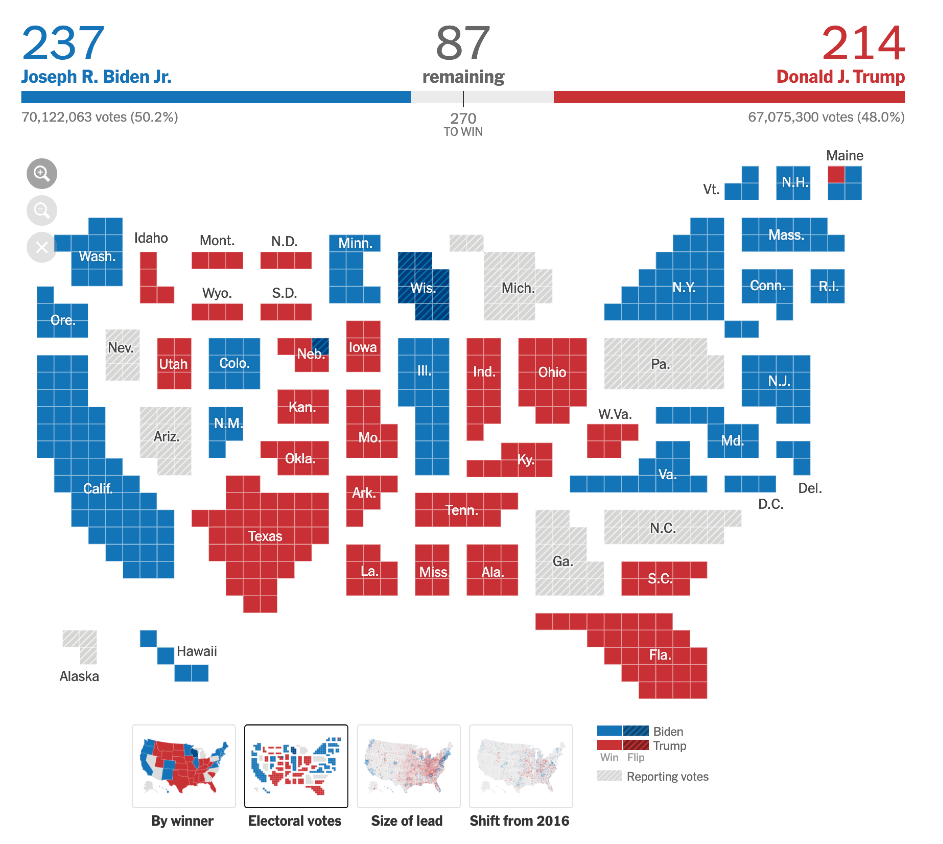
NYT Electoral College cartogram

Distorts geography by value

Uniform Cells Instead of Counties: Uber’s H3

Replace arbitrary regions with a grid of equal hexagons: count events per cell.
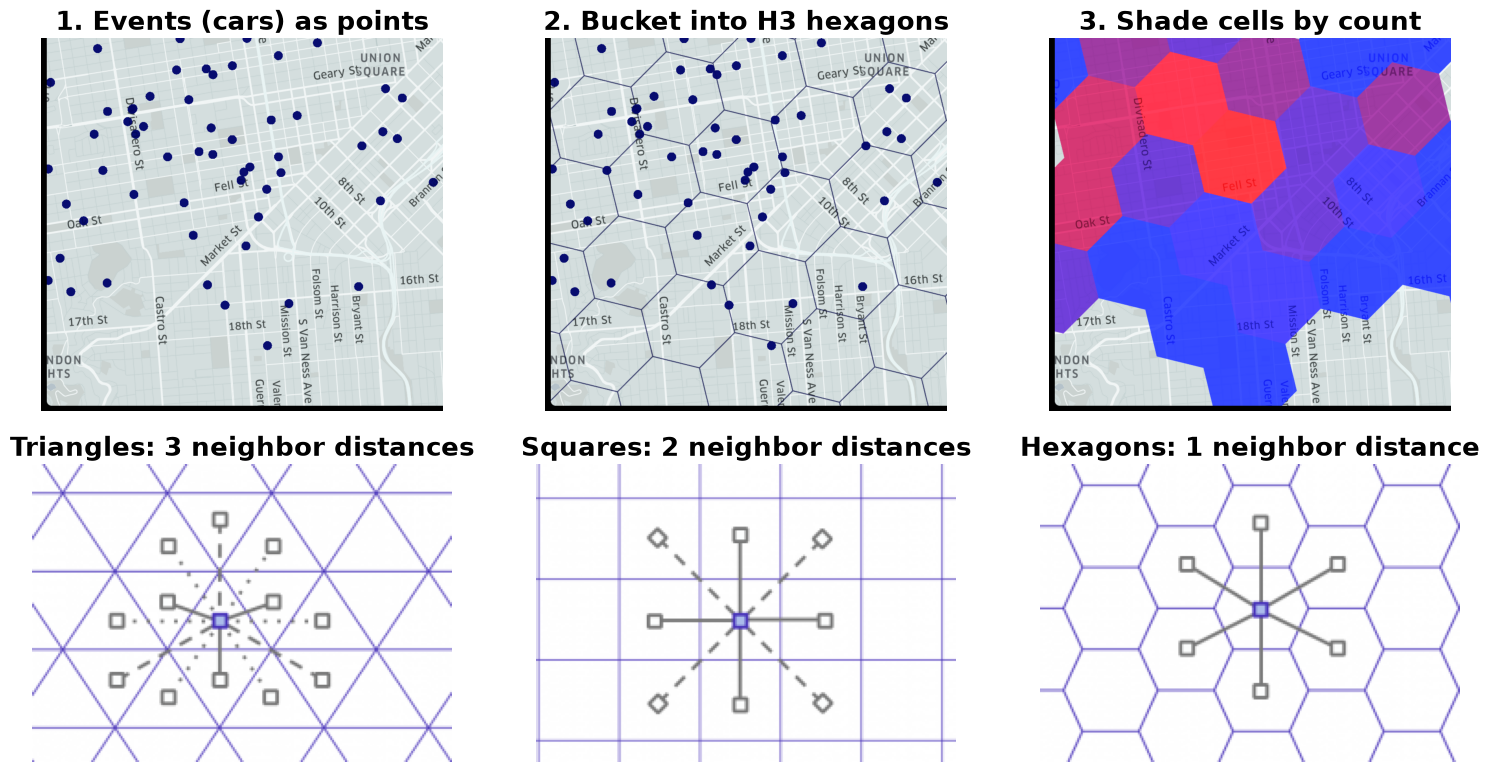
From Uber's H3 post: points bucketed into hexagons and shaded by count; neighbor distances for triangle, square and hexagon grids

Same Crashes, Three Cell Sizes

Change the cell size and the “worst” place moves.
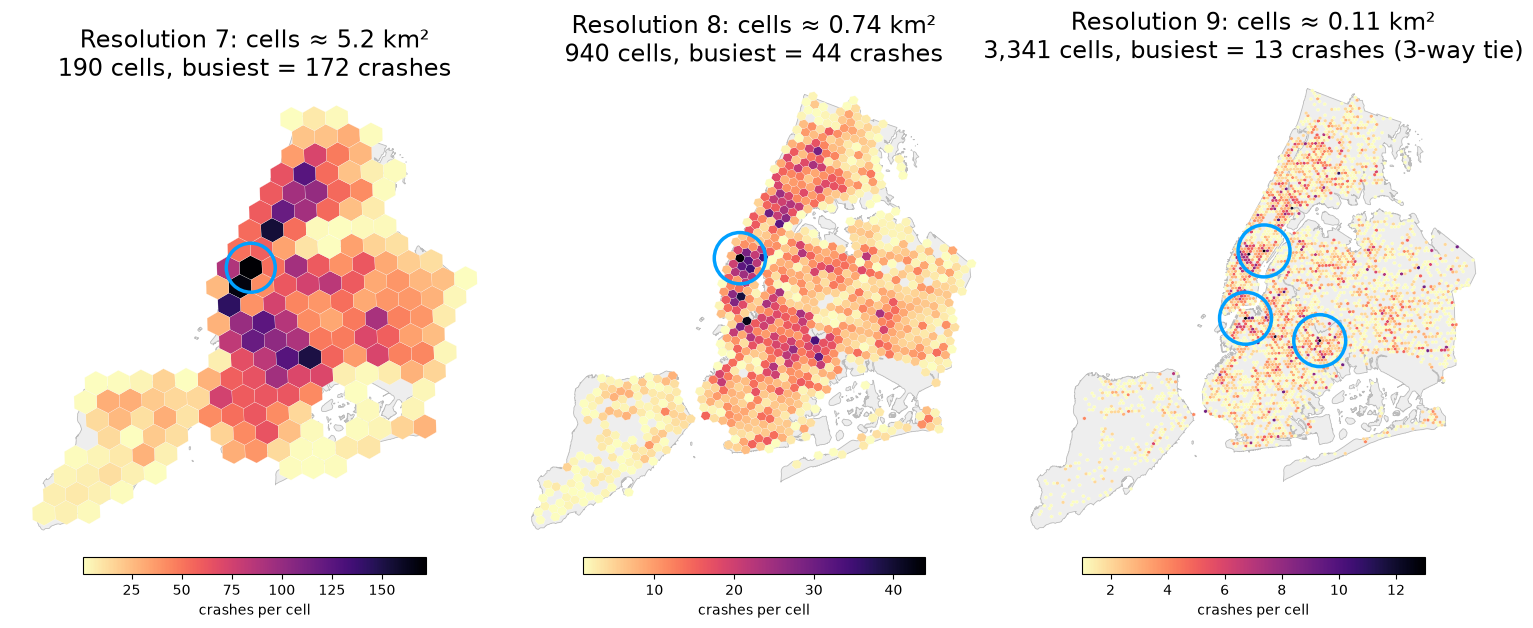
NYC motor-vehicle crashes in September 2025 counted in H3 cells at resolutions 7, 8 and 9; circles mark the busiest cell(s)

Part 6: Beyond Geographic Accuracy

Sometimes, the Best Map Abandons Geography

Beck’s London Tube Diagram (1933)
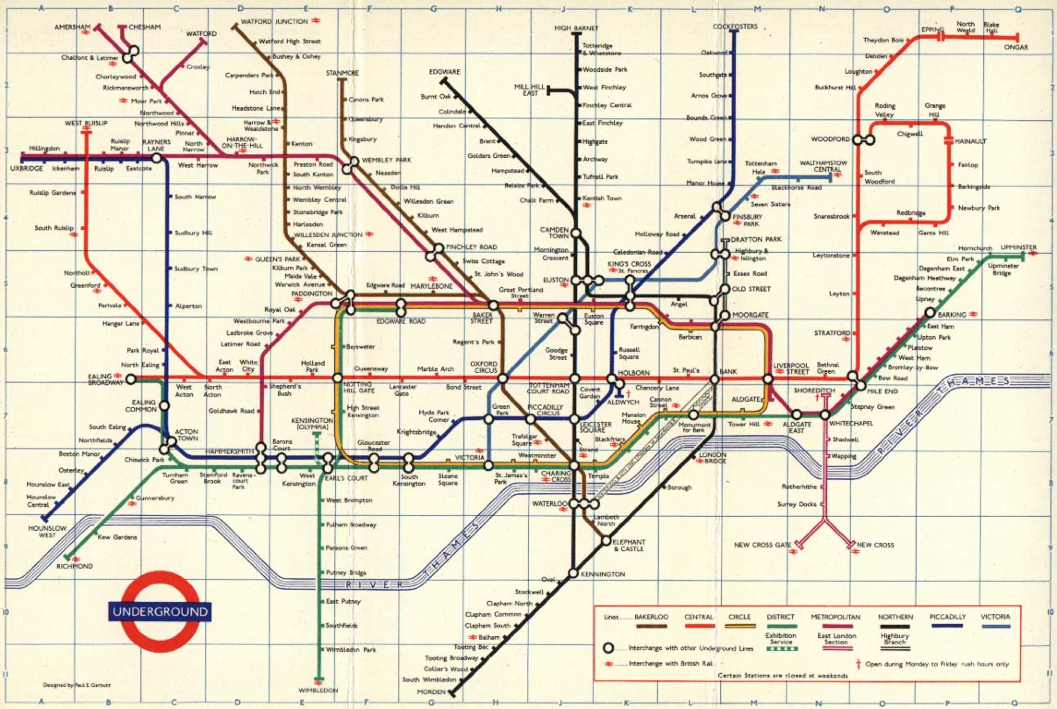
Harry Beck’s London Underground map

Geographically “wrong” but topologically “right”

What Beck realized:

  • For subway riders, exact geographic paths don’t matter
  • What matters: sequence of stops and where to transfer

His innovations:

  • Straightened lines
  • Regularized angles (45° or 90°)
  • Even spacing between stations
  • Prioritized topology over geography

Bridge to Next Lecture: Urban Visualization

  • Today: Geographic maps (accurate spatial representation)
  • Next week: Urban visualizations (prioritize usability and patterns)
  • Week 10: 3D city models & simulation (linking 3D form with 2D data views)

The tube map is our bridge: it shows that sometimes the most effective visualization deliberately distorts reality to better serve the user’s task.

Summary & Key Takeaways

Five Critical Lessons

  1. Use a map only when the spatial question matters
    • Bar charts are better for ranking and lookup
  2. Projections always distort—choose wisely
    • Equal-area for choropleths (if you shade areas)
  3. NEVER use raw counts on choropleths
    • Always normalize: per capita, density, or rate
  4. Choose classification and colors carefully
    • Binning method changes the story
    • Sequential vs. diverging scales
  5. Geography itself can mislead (MAUP)
    • Consider symbols, cartograms, or other encodings

Be a Critical Consumer

When you see a map, ask:

  • What’s the projection?
  • Is it normalized?
  • What’s the classification method?
  • What’s the color scale?
  • Is land area misleading the message?

When you make a map, remember:

  • Is a map the right choice?
  • Have I used equal-area projection?
  • Have I normalized my data?
  • Are my bins defensible?
  • Are my colors perceptually uniform?

Next Time: Urban Visualization: Flows, Time & Interactivity

Further Reading

Essential Resources

Choropleth Map Best Practices

  • Datawrapper Guide to Choropleth Maps
    • Comprehensive guide to creating effective choropleth maps
    • Covers normalization, classification, and color choices
    • Practical examples and common pitfalls

When Not to Use Maps

  • When Maps Shouldn’t Be Maps by Matthew Ericson (NYT)
    • Critical discussion of map vs. alternative visualizations
    • Real-world examples from data journalism
    • Decision framework for choosing visualization types

Interactive Tools

Acknowledgments

Course Materials

This lecture was developed using materials from:

  • Prof. Enrico Bertini (NYU Tandon)
    • Visualizing Geographical Data lecture slides
    • Information Visualization course materials
  • Prof. Jeff Heer (University of Washington)
    • CSE512: Data Visualization course
    • Maps and Cartography lecture materials

SUPPLEMENTAL MATERIAL

Implementation & Tooling

Part 7: When to Use a Map?

The Fundamental Question

Not all geographical data needs a map.

The Trade-off

Maps use the x and y spatial dimensions to encode geography.

This means x and y cannot be used to encode other data variables (unlike a bar chart or scatterplot).

So when is a map the right choice?

When to Use a Map: Decision Framework

✓ Good Use: Spatial Questions

  • “How are these phenomena clustered?”
  • “What is near this location?”
  • “How does this value change continuously over a region?”
  • “Where is the path from A to B?”
  • “What are the boundaries between regions?”

Use a map when: The spatial relationship is the question.

✗ Bad Use: Aggregate Comparisons

  • “Which state has the highest value?”
  • “What are the top 5 regions?”
  • “How do these rank?”

Use a bar chart when: You need precise comparisons or rankings.

Why? Maps introduce area bias—Montana looks more “important” than Rhode Island simply due to land area.

Part 8: Geographic Data Formats

GeoJSON: The Web Standard

GeoJSON is the lingua franca of web mapping.

  • It’s a JSON format that describes geographic features
  • Human-readable and machine-parsable
  • Supported by nearly all modern mapping libraries

Key Components

  • FeatureCollection: A list of all features
  • Feature: A single geographic “thing” (park, city, road)
  • geometry: The shape (Point, LineString, Polygon)
  • properties: Non-spatial data (name, population, ID)

GeoJSON Structure: Example

{
  "type": "FeatureCollection",
  "features": [
    {
      "type": "Feature",
      "properties": {
        "name": "NYU Bobst Library",
        "type": "Library"
      },
      "geometry": {
        "type": "Point",
        "coordinates": [-73.997421, 40.729454]
      }
    },
    {
      "type": "Feature",
      "properties": { "name": "W 4th Street", "type": "Street" },
      "geometry": {
        "type": "LineString",
        "coordinates": [
          [-74.000277, 40.731868],
          [-73.997873, 40.731557]
        ]
      }
    },
    {
      "type": "Feature",
      "properties": { "name": "Washington Square Park" },
      "geometry": {
        "type": "Polygon",
        "coordinates": [
          [
            [-73.999, 40.732], [-73.996, 40.732],
            [-73.996, 40.730], [-73.999, 40.730],
            [-73.999, 40.732]
          ]
        ]
      }
    }
  ]
}

TopoJSON: Optimized Geography

TopoJSON is an optimized version of GeoJSON.

Key Advantages

  • Compressed: Much smaller file sizes
  • Topology-aware: Stores shared boundaries only once
  • Better for web: Faster downloads and parsing

The Insight

Instead of storing the border between Colorado and Utah twice, TopoJSON stores the arc once and notes it’s shared by both states.

When to Use

  • Large geographic datasets (countries, states)
  • Web applications (file size matters)
  • When features share boundaries

Tools

  • MapShaper: Convert, simplify, and edit
  • topojson-client: Convert back to GeoJSON

Part 9: Data Classification Methods

The Binning Problem

For choropleth maps, how you “bin” your data into color classes can completely change the story.

County unemployment rate (≈2009, BLS LAUS): equal interval, quantile and Jenks classes on the same five colors

Same data. Different bins. Different conclusions.

Classification Methods Compared

Equal Interval

Divides the range into equal-sized steps (e.g., 0-10, 10-20, 20-30).

  • ✓ Easy to understand and explain
  • ✗ Problem: Outliers can skew all data into one or two bins

Quantile (Equal Count)

Puts the same number of data points in each bin.

  • ✓ Good for showing relative ranking
  • ✗ Problem: Can be misleading if values are naturally clustered

Jenks Natural Breaks

Finds “natural” clusters/gaps in the data using statistical optimization.

  • ✓ Often the most honest default
  • ✗ Problem: Can be arbitrary if data is uniformly distributed

Choosing Your Classification

Method Best For Watch Out For
Equal Interval Evenly distributed data; meaningful intervals Outliers dominating the map
Quantile Ranking; highly skewed data Hiding natural clustering; arbitrary bin edges
Jenks Natural Breaks Data with natural groups/gaps Uniform data; hard to explain to audience
Manual Expert knowledge; specific breakpoints Subjectivity; cherry-picking

Key Takeaway

Always justify your choice. Show the data distribution (histogram) and explain why your classification makes sense for your story.

Part 10: Practical Implementation with Leaflet.js

Leaflet.js: Simple Web Mapping

Leaflet is a lightweight, open-source JavaScript library for interactive maps.

  • Simple API: Easy to learn, powerful results
  • Tile-based: Handles the “slippy map” (zoom, pan) automatically
  • Extensible: Plugins for everything from clustering to heat maps
  • Perfect for: Adding interactive maps to web applications

Let’s build a simple example using our NYU GeoJSON data.

Leaflet: HTML Setup

<!-- 1. Include Leaflet CSS & JS from a CDN -->
<link rel="stylesheet"
      href="https://unpkg.com/leaflet@1.9.4/dist/leaflet.css"/>
<script src="https://unpkg.com/leaflet@1.9.4/dist/leaflet.js"></script>

<!-- 2. Style the map container to fill the screen -->
<style>
    #map { height: 100vh; }
</style>

<!-- 3. Create the map div -->
<body>
    <div id="map"></div>
</body>

Leaflet: Initialize the Map

// 1. Initialize the map and set view [lat, long], zoom
const map = L.map('map').setView([40.7308, -73.9973], 14);

// 2. Add a tile layer (the base map)
L.tileLayer('https://{s}.tile.openstreetmap.org/{z}/{x}/{y}.png', {
    attribution: '&copy; OpenStreetMap contributors',
    maxZoom: 19
}).addTo(map);

Leaflet: Add GeoJSON Data

// 3. Define our GeoJSON data
const myGeoJSON = { /* ... from example.geojson ... */ };

// 4. Add GeoJSON layer to the map
L.geoJSON(myGeoJSON, {
    // For each feature, bind a popup with its name
    onEachFeature: function (feature, layer) {
        if (feature.properties && feature.properties.name) {
            let popup = '<h4>' + feature.properties.name + '</h4>';
            popup += '<p>' + feature.properties.description + '</p>';
            layer.bindPopup(popup);
        }
    }
}).addTo(map);

// Points, lines, and polygons are automatically styled
// Click any feature to see its popup
// Pan and zoom the map to explore

Live Demo

Let’s see it in action!

Open: examples/leaflet_example.html

  • Base map tiles loading
  • Pan and zoom controls
  • GeoJSON features rendered:
    • Point: NYU Bobst Library (red circle)
    • LineString: W 4th Street (blue line)
    • Polygon: Washington Square Park (green area)
  • Click any feature to see its popup